Generating Terraform from Helm isn't strange because it's hard. It's strange because you realize there was never a technical reason it wouldn't work.
Application-Driven Infrastructure — a four-part series:
Part 1: Your Helm Chart Already Knows More Than Terraform Does · Part 2: Generating Terraform from Helm · Part 3: Building a Self-Describing Platform · Part 4: Your Helm Chart Is Really an Abstract Syntax Tree
The strange part about generating Terraform from Helm isn’t that it works. The strange part is realizing there was never a technical reason it wouldn’t.
Helm renders text. Terraform is text. Doug McIlroy told us decades ago to build programs around text streams, “because that is a universal interface” — and Helm took that advice whether it meant to or not. The template engine has no idea it’s producing Kubernetes YAML. It’s producing characters. Point it at a template full of HCL and it will produce HCL, happily and without comment.
So the interesting question was never can Helm emit .tf files. It’s whether your service metadata should drive them — and in Part 1 I argued that for application-adjacent infrastructure, it should. This article is the practical half of that argument. By the end you’ll have a repository layout, working templates, a CI pipeline you’re welcome to copy, and the state-management and validation practices that keep the whole thing from becoming a footgun.
Let’s build it.
The Repository Layout
Here’s the shape of a service repository using this pattern:
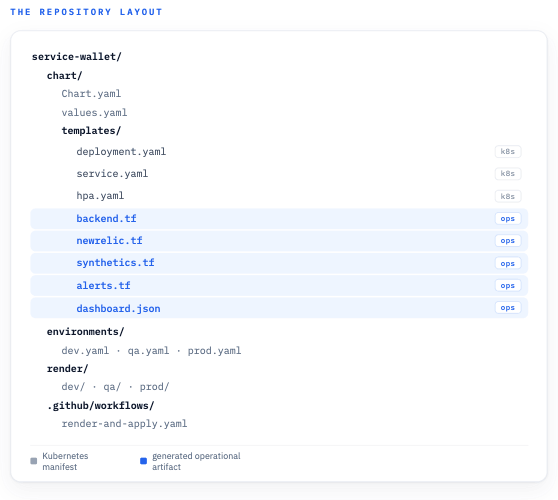
One repository, one chart: Kubernetes manifests and operational Terraform templates live side by side under templates/.
Nothing exotic. The only unusual residents are the .tf and .json files sitting inside templates/ right next to the Kubernetes manifests — and that placement is the whole trick. Helm renders every file in templates/ (the exceptions are partials starting with _ and NOTES.txt), and each rendered file keeps its original name. Name the template newrelic.tf and the rendered output is a file called newrelic.tf full of real HCL. That’s why I’m not using a .tf.tpl extension: Helm wouldn’t strip the .tpl off for you, and downstream tooling wants files that literally end in .tf. (That backend.tf in there is doing quiet but important work — we’ll get to it in the state section.)
One caveat before we go further, because it’ll bite you otherwise: if this same chart is ever fed to helm install or a GitOps controller like Argo CD, those tools will try to interpret your Terraform templates as Kubernetes manifests and get very confused. The easy fix is to gate the non-Kubernetes templates behind a flag:
{{- if .Values.renderOperationalArtifacts }}
# ...terraform content...
{{- end }}
Leave the flag false by default and set it only in the CI render step with --set renderOperationalArtifacts=true. Your deployment path never sees the Terraform templates, your render path does, and everybody stays friends. (If you’d rather keep the concerns physically separate, a sibling “ops chart” that shares the same values files works too — same idea, more directories.)
The Values File
Here’s the part I want you to internalize: the values file barely changes. This is mostly the values.yaml you already have, with a few operational fields added on:
service:
  name: wallet
  port: 8080

image:
  repository: ghcr.io/company/wallet
  tag: 1.4.2

health:
  path: /version

ingress:
  enabled: true
  host: wallet.example.com
  path: /

owner:
  team: payments
  email: payments@example.com

criticality: high

observability:
  newrelic:
    enabled: true
    tagEntity: false
  synthetics:
    enabled: true
  alerts:
    latencyMs: 500
    errorRatePercent: 2
The service, image, health, and ingress blocks were going to exist no matter what — your deployment.yaml and service.yaml templates already consume them. The additions are owner, criticality, and observability: the operational intent that used to live scattered across Terraform variables, dashboard filters, and tribal knowledge. Now it lives next to the port number it describes. (That tagEntity flag looks a little mysterious right now — its job becomes clear in the next section.)
Per-environment files override the base, exactly as you’d expect:
# environments/prod.yaml
environment: prod

ingress:
  host: wallet.example.com

observability:
  alerts:
    latencyMs: 300
That environment key isn’t a Helm builtin — it’s just a value we’re setting per environment file so the templates can consume it. Prod gets tighter latency alerting than dev by changing one number in one file. You’re probably starting to see the pattern here: every fact lives exactly once, and everything downstream is a function of it.
The Terraform Template
Now for the fun part. Here’s templates/newrelic.tf (the render gate from earlier omitted for readability):
resource "newrelic_synthetics_monitor" "{{ .Values.service.name }}" {
  name             = "{{ .Values.service.name }}-{{ .Values.environment }}"
  type             = "SIMPLE"
  status           = "ENABLED"
  period           = "EVERY_5_MINUTES"
  locations_public = ["US_EAST_1"]

  uri = "https://{{ .Values.ingress.host }}{{ .Values.health.path }}"
}

{{- if .Values.observability.newrelic.tagEntity }}
data "newrelic_entity" "service" {
  name   = "{{ .Values.service.name }}-{{ .Values.environment }}"
  domain = "APM"
  type   = "APPLICATION"
}

resource "newrelic_entity_tags" "{{ .Values.service.name }}" {
  guid = data.newrelic_entity.service.guid

  tag {
    key    = "team"
    values = ["{{ .Values.owner.team }}"]
  }

  tag {
    key    = "criticality"
    values = ["{{ .Values.criticality }}"]
  }
}
{{- end }}
Look at what’s happening in that uri line. The synthetic monitor’s target URL is assembled from ingress.host and health.path — the exact same values the ingress manifest and the readiness probe are built from. Remember the drift scenario from Part 1, where the health endpoint moves from /healthz to /version and the synthetic monitor keeps probing the old path forever? That scenario is now structurally impossible. The monitor cannot disagree with the probe, because they’re two renderings of the same fact.
Helm doesn’t know or care that this file is HCL instead of YAML. {{ .Values.service.name }} interpolates identically either way. You already know how to write these templates — you’ve been writing them for years. The only thing that changed is the file extension.
I won’t pretend Go templates emitting HCL is glamorous, though. The quoting and whitespace will occasionally annoy you, and a typo produces rendered-but-invalid HCL that you’ll be debugging from the output side. Keep the templates small and push the complexity into Terraform modules — we’re getting to those shortly — and it stays firmly manageable.
One ordering gotcha worth knowing before your first run: the newrelic_entity data source looks up the service’s APM entity, and that entity doesn’t exist until the service has deployed and reported at least once. That’s why the tagging block is gated behind tagEntity — leave it false for a brand-new service’s first pipeline run, flip it once the service is reporting, and you’re set. The synthetic monitor has no such dependency, so day-one uptime coverage still works. (Also: check your provider’s major version before copying — the synthetics attribute names shifted between v2 and v3, and this block targets v3.)
Rendering the Artifacts
Rendering is one command:
helm template wallet ./chart \
  --values ./environments/prod.yaml \
  --set renderOperationalArtifacts=true \
  --output-dir ./render/prod
One small heads-up: --output-dir nests output under the chart’s name, so the files actually land in ./render/prod/wallet/templates/. Peek inside and voilà:
render/prod/wallet/templates/
  deployment.yaml
  service.yaml
  hpa.yaml
  backend.tf
  newrelic.tf
  synthetics.tf
  alerts.tf
  dashboard.json
Kubernetes manifests and Terraform, sitting side by side, born from the same values file. From here the pipeline just needs to sort them by destination: YAML goes wherever your deployments already go, and .tf goes to Terraform.

The render-and-apply pipeline: one values file renders, artifacts sort by type, and the Terraform half runs the familiar fmt / init / validate / plan / apply chain.
The CI Discovery Pattern
The discovery step is deliberately boring. Find the .tf files, gather them into a working directory, and run the Terraform workflow you’d run on handwritten code:
GENERATED_TF_DIR="./render/prod/terraform"

mkdir -p "$GENERATED_TF_DIR"

find ./render/prod -name "*.tf" -exec cp {} "$GENERATED_TF_DIR" \;

cd "$GENERATED_TF_DIR"

terraform fmt -recursive
terraform init
terraform validate
terraform plan
That’s it. No custom orchestrator, no plugin, no operator. find, cp, and the same five Terraform commands you already know. That’s because the generated files are just Terraform — the moment they exist on disk, nothing about their origin matters to the toolchain.
Here’s the finished copy of the GitHub Actions workflow, wired for plan-on-PR and apply-on-merge:
name: render-and-apply

on:
  pull_request:
  push:
    branches: [main]

env:
  ENVIRONMENT: prod
  TF_DIR: render/prod/terraform

jobs:
  render-and-plan:
    runs-on: ubuntu-latest
    steps:
      - uses: actions/checkout@v4

      - uses: azure/setup-helm@v4

      - uses: hashicorp/setup-terraform@v3

      - name: Lint chart
        run: helm lint ./chart --values ./environments/${ENVIRONMENT}.yaml

      - name: Render chart
        run: |
          helm template wallet ./chart \
            --values ./environments/${ENVIRONMENT}.yaml \
            --set renderOperationalArtifacts=true \
            --output-dir ./render/${ENVIRONMENT}

      - name: Collect generated Terraform
        run: |
          mkdir -p ${TF_DIR}
          find ./render/${ENVIRONMENT} -name "*.tf" -exec cp {} ${TF_DIR} \;

      - name: Terraform fmt
        run: terraform -chdir=${TF_DIR} fmt -recursive

      - name: Terraform init
        run: terraform -chdir=${TF_DIR} init

      - name: Terraform validate
        run: terraform -chdir=${TF_DIR} validate

      - name: Terraform plan
        run: terraform -chdir=${TF_DIR} plan -out=tfplan

      - name: Upload rendered output
        uses: actions/upload-artifact@v4
        with:
          name: rendered-${{ env.ENVIRONMENT }}
          path: render/

  apply:
    if: github.ref == 'refs/heads/main'
    needs: render-and-plan
    runs-on: ubuntu-latest
    environment: prod
    steps:
      - uses: actions/checkout@v4
      - uses: azure/setup-helm@v4
      - uses: hashicorp/setup-terraform@v3

      - name: Render and apply
        run: |
          helm template wallet ./chart \
            --values ./environments/${ENVIRONMENT}.yaml \
            --set renderOperationalArtifacts=true \
            --output-dir ./render/${ENVIRONMENT}
          mkdir -p ${TF_DIR}
          find ./render/${ENVIRONMENT} -name "*.tf" -exec cp {} ${TF_DIR} \;
          terraform -chdir=${TF_DIR} init
          terraform -chdir=${TF_DIR} apply -auto-approve
You’re more than welcome to copy and paste this and adapt it. To make it yours: matrix the jobs over your environments instead of hardcoding prod, add provider credentials as secrets, and put a protection rule on the prod environment so the apply job waits for a human. If your reviewers want the plan in the PR itself, there are a handful of marketplace actions that post terraform plan output as a comment — a worthwhile addition, since a visible plan is what makes generated Terraform feel trustworthy instead of spooky.
Two details in there worth calling out. First, fmt runs in write mode, not -check — the rendered files aren’t committed, so you’re normalizing generated output, not gating on it. Template-emitted HCL almost never survives -check, and failing the build over whitespace you generated yourself helps nobody. Second, the init step needs no backend flags at all, because the chart renders its own backend.tf — that’s the quiet file from the repository layout, and the state section below shows what’s inside it.
One honest caveat about the apply job: it re-renders and re-plans on merge, so if the world moved between review and merge, what applies can differ from what was approved. This is the standard trade-off of plan-on-PR workflows, not something this pattern invented — but if your shop is strict about it, upload the tfplan file from the PR job as an artifact and apply exactly that plan.
Keeping Terraform State Sane
Whatever you do, don’t dump every generated resource into one global state file. State layout is the difference between this pattern scaling gracefully and this pattern becoming the thing your team whispers about in retros. You’ve got three sensible options.
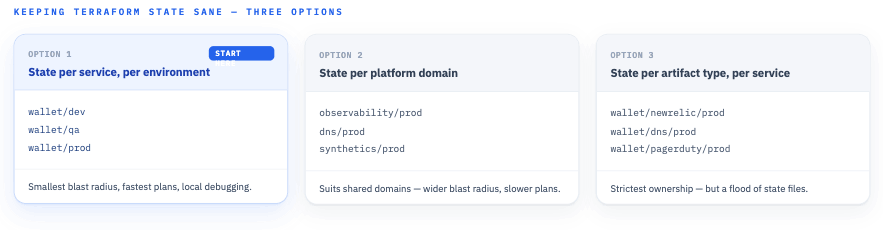
Three ways to lay out state. Start with the first — state per service per environment — for the smallest blast radius and the simplest mental model.
Option 1: State per service per environment
Each service-environment pair gets its own state. Isolation is excellent: a bad apply for wallet in dev cannot touch anything else, plans stay fast, and debugging stays local. The one cost worth knowing: a fleet of per-service states means a fleet of concurrent plans, so keep an eye on your provider’s API rate limits as the service count grows — staggering the schedules is the easy fix if you bump into them.
Option 2: State per platform domain
All services’ observability resources share one state per environment. This suits genuinely shared operational domains, at the cost of a wider blast radius and slower plans as services multiply.
Option 3: State per artifact type per service
Maximum granularity and the strictest ownership boundaries — but you’ll drown in state files before you drown in anything else.
Start with Option 1: service + environment. It keeps the blast radius small, the mental model simple, and the failure modes debuggable. That’s because a generated system already asks reviewers to trust one level of indirection; the state layout shouldn’t add another.
So how does the pipeline actually get that layout? The chart renders it. This is the job of that backend.tf sitting in the templates/ directory — here’s what’s inside:
terraform {
  backend "s3" {
    bucket = "company-terraform-state"
    key    = "services/{{ .Values.service.name }}/{{ .Values.environment }}/terraform.tfstate"
    region = "us-east-1"
  }
}
The state key is derived from the same two values as everything else, which means even the state layout is a function of the application model. A neat little trick — and a necessary one: terraform init needs a backend block to know where state lives, and generating it is exactly what lets the workflow’s init step run with no flags at all. (Swap s3 for your backend of choice; the idea carries over unchanged.)
Module Boundaries
Raw resources in templates, like the New Relic example above, are fine for getting started. At scale, don’t generate piles of low-level Terraform — generate module invocations:
module "wallet_synthetics" {
  source = "git::https://github.com/company/platform-modules.git//newrelic-synthetic"

  service_name = "{{ .Values.service.name }}"
  url          = "https://{{ .Values.ingress.host }}{{ .Values.health.path }}"
  team         = "{{ .Values.owner.team }}"
  criticality  = "{{ .Values.criticality }}"
}
The division of labor is clean: Helm templates stay small and carry the service metadata, while versioned Terraform modules encapsulate the provider-specific implementation. When the platform team improves the synthetic-monitor module, every service picks it up on the next render without a single chart changing. Provider details get tested once, in the module, instead of copy-pasted into a hundred rendered files.
Validation Layers
Here’s the sentence I’d tattoo on this whole pattern if I could: generated infrastructure needs the same review and validation as handwritten infrastructure. Generation removes drift; it does not remove the need for scrutiny. A production implementation validates at four layers.
Helm validation catches bad inputs before anything is rendered: helm lint, a values.schema.json so malformed values fail loudly, required-value checks ({{ required "owner.team is mandatory" .Values.owner.team }}), and template unit tests if you’re feeling thorough.
Terraform validation catches bad outputs: terraform fmt (which doubles as a smoke test that you emitted syntactically plausible HCL), terraform validate, and terraform plan — the plan being the single most important artifact in the whole pipeline.
Policy validation catches legal-but-wrong: OPA/Conftest, Checkov, or tfsec running against the rendered output, plus whatever custom platform rules you care about. The lovely thing about validating rendered artifacts is that the policy engine sees concrete values, not templating logic.
Human review catches everything else. Either commit the rendered output to the repo, upload it as a CI artifact like the workflow above does, or post rendered diffs into pull requests. Pick at least one.
The Pull Request Workflow
Put it all together and a change flows like this:
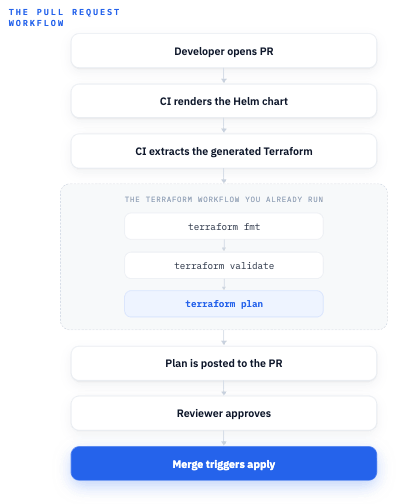
The pull request workflow: render, extract, validate, and plan on the PR; apply on merge. The reviewer approves a concrete plan, same as always.
Notice this is just the Terraform PR workflow you already run, with a render step bolted on the front. The reviewer isn’t approving templating magic — they’re approving a concrete plan, same as always.
Lessons Worth Learning the Easy Way
A few things worth learning from an article instead of an incident.
Lesson 1: Don’t hide the generated output
If developers can’t see what was generated, they won’t trust the system — and honestly, they shouldn’t. Commit the render output or publish it as an artifact, but make it inspectable either way. Mystery generation is how patterns like this get ripped out six months in.
Lesson 2: Keep templates small
A 400-line .tf template is a code smell. Prefer small templates that call versioned Terraform modules, per the boundary above. If a template is getting long, the logic it contains probably belongs in a module.
Lesson 3: Respect the foundational boundary
Do not use this pattern to create clusters, VPCs, or account foundations. The lifecycle test from Part 1 applies: generate what should live and die with the service, and nothing else.
Lesson 4: Make ownership explicit
Every generated artifact should carry team, service, environment, and criticality metadata. It costs a few template lines and pays for itself the first time somebody asks “what is this monitor and who do I page about it?”
Lesson 5: Fail early
Missing health endpoint? Missing owner? Missing criticality tier? Fail the render step, before anything reaches Terraform. required in the template and a values schema get you most of the way there. A render failure at PR time is a friendly nudge; a half-configured monitor in prod is a mystery.
Lesson 6: Avoid magic
The pipeline should be boring: render, discover, validate, plan, apply. No hidden orchestration layer, no bespoke operator, no clever daemon watching for changes. Boring pipelines are the ones that are still running untouched two years later.
Lesson 7: The reconciler always wins
Once Terraform owns a generated monitor, hand edits in the provider’s UI get reverted on the next apply. That’s not a bug — reconciliation is the entire point — but it surprises people the first time their clickops tweak silently disappears. Make it loud in your platform docs: the values file is the place to change things, and the UI is read-only by convention. If someone genuinely needs a UI-managed exception, take that resource out of the generated set rather than fighting the apply loop.
What’s Next
Generating Terraform from Helm isn’t the goal by itself — it’s one concrete payoff of a bigger idea, which is keeping operational infrastructure permanently synchronized with the application model. In the next article in this series we’ll push past Terraform entirely: dashboards, alerts, service catalogs, runbooks, diagrams, and internal platform APIs, all generated from the same metadata. The destination is a platform that can describe itself.