Most platforms aren't missing tools. They're missing a reliable model of what a service actually is.
Application-Driven Infrastructure — a four-part series:
Part 1: Your Helm Chart Already Knows More Than Terraform Does · Part 2: Generating Terraform from Helm · Part 3: Building a Self-Describing Platform · Part 4: Your Helm Chart Is Really an Abstract Syntax Tree
Most platforms are not missing tools. They’re missing a reliable model of what exists.
Think about it: a typical platform already has Kubernetes, Terraform, Grafana or New Relic, PagerDuty, Backstage, GitHub Actions, and a documentation wiki. That’s plenty of tooling by any measure. And yet the platform still feels fragmented — because none of those systems agree on what a service is. Ask the dashboard tool, the alerting tool, the catalog, and the wiki about the same service and you’ll get four overlapping, slightly contradictory answers, none of which anyone fully trusts.
In Part 1 we named the pattern — Application-Driven Infrastructure — and in Part 2 we built the first concrete implementation, rendering Terraform from a Helm chart and wiring it into CI/CD. This article is about how far the pattern actually reaches. Terraform turns out to be the opening act. Once application metadata is the source of truth, the platform can generate most of the operational surface area around every service, and something interesting happens: the platform becomes self-describing.
The Service as the Unit of Platform Knowledge
First off, we need to agree on what we’re modeling. A service is more than a deployment. Beyond the runtime configuration, a real service has ownership, health endpoints, dependencies, dashboards, alerts, runbooks, domains, SLOs, a cost center, a criticality tier, on-call routing, compliance obligations, and release metadata. Every one of those facts is knowledge somebody on your team currently holds — in a config file, in a wiki, or in their head.
A self-describing platform treats those facts as structured metadata with one home. Here’s the wallet service from the last two articles, grown into a fuller model:
service:
  name: wallet
  description: Handles wallet balance and transaction APIs
  tier: critical

owner:
  team: payments
  slack: "#team-payments"
  email: payments@example.com

runtime:
  language: go
  port: 8080
  healthPath: /version

environment:
  name: prod
  namespace: payments-prod

ingress:
  host: wallet.example.com
  path: /

observability:
  dashboards: true
  alerts: true
  synthetics: true
  slo:
    availability: 99.9
    latencyMs: 500

operations:
  runbook: true
  pagerduty: true

cost:
  businessUnit: payments
  product: wallet
Whether this lives in values.yaml proper or in a dedicated metadata file the chart imports is an implementation detail. What matters is that it’s structured, versioned, reviewed in pull requests, and — critically — the same file that drives the deployment. Nobody maintains it out of civic duty. It gets maintained because the service won’t ship without it.
One Model, Many Projections
From that single model, the platform can generate an honestly startling list of artifacts:
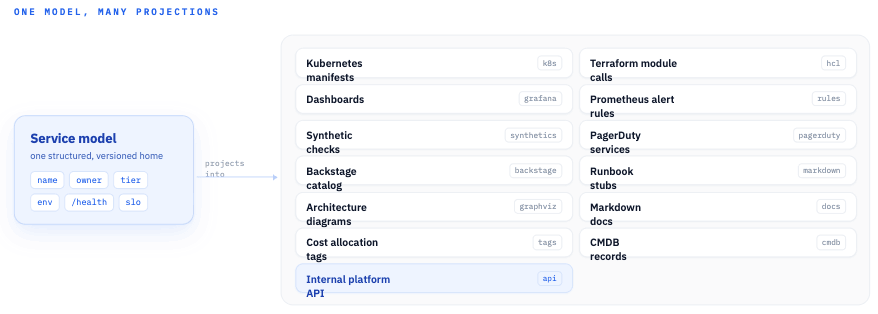
One model, many projections: every artifact is the same service facts rendered into a different target’s format — which is why none of them can permanently drift.
The word I want you to hold onto is projection. Every artifact on that list is a projection of the service model into some target system’s format — the same facts, wearing different clothes. That framing matters because projections have a wonderful property: they can always be regenerated, which means they can never permanently drift. Let’s walk through the big ones.
Dashboards
Handcrafting a dashboard for every service is like hand-lettering every street sign in a city. It technically works, the first few even look charming, and the approach collapses the moment you have more than a handful — with the added insult that every sign painter had slightly different taste.
The truth is that a baseline service dashboard is almost entirely determined by metadata the model already contains: the service name, namespace, workload labels, environment, runtime, and criticality tier tell you exactly which golden-signal queries to build. So generate it. Every service gets a standard dashboard — latency, traffic, errors, saturation, filtered to its actual labels — from day one, automatically.
Does that mean no more custom dashboards? Not at all. Teams should absolutely craft bespoke views for their weird, interesting problems. But bespoke should be the exception layered on top of a generated baseline, not the price of admission for having any dashboard whatsoever.
Alerts
Alerts follow the same logic. The thresholds are already sitting in the model:
alerts:
  latency:
    warningMs: 500
    criticalMs: 1000
  errorRate:
    warningPercent: 2
    criticalPercent: 5
The platform translates that intent into whatever the provider speaks — New Relic alert policies, Datadog monitors, PrometheusRule resources. The team declares what good looks like; the platform handles the provider-specific incantations. And because tier: critical is in the model too, the platform can route those alerts to the right escalation policy without anyone wiring it up by hand.
Notice what this does to alert quality across the fleet. The usual situation is that your oldest services have lovingly tuned alerts and your newest ones have none, because alerting is always the task that slips. Generated alerts invert that: coverage is the default, and tuning is the incremental improvement.
Synthetic Monitoring
We built one of these in Part 2, so I won’t spend long here. Any service with a public ingress and a health endpoint has everything a synthetic check needs — the domain, the path, the environment, and a criticality tier to set the check frequency:
synthetics:
  enabled: true
  path: /version
  frequencyMinutes: 5
  locations:
    - us-east
    - us-west
The rule practically writes itself: public ingress plus health endpoint equals synthetic monitor, automatically. The service that forgot to set up uptime monitoring simply stops existing as a category.
The Service Catalog as a Projection
Service catalogs are where the projection framing pays off hardest. Backstage’s catalog-info.yaml is a natural render target:
apiVersion: backstage.io/v1alpha1
kind: Component
metadata:
  name: wallet
  tags:
    - payments
    - critical
spec:
  type: service
  owner: payments
  lifecycle: production
Here’s the blunt version: a hand-maintained service catalog is just another database that drifts. Teams fill it in during onboarding week, and eighteen months later half the owners listed have changed teams. Generated from the service model, the catalog stops being a chore anyone performs and becomes a view of reality that’s exactly as fresh as the last deploy. (Standing up Backstage itself is beyond the scope of this series — the point is that whatever catalog you run should be a projection, not a second source of truth.)
Documentation, Runbooks, and Diagrams
The same metadata can stamp out a documentation stub for every service:
# wallet

Owner: payments
Environment: prod
Namespace: payments-prod
Health endpoint: /version
Dashboard: generated
Runbook: generated
On-call: payments
Let’s be clear about what this is and isn’t. Generated docs are not a replacement for deep, human-written documentation — nobody’s architecture decisions are getting explained by a template. Think of the stub like the safety card in an airplane seat pocket: nobody’s idea of great literature, but accurate, standardized, and exactly where you expect it when things go wrong.
That’s precisely what you want at 2 AM. The incident-response value of documentation is mostly in the boring facts — who owns this, where does it run, where’s the dashboard — and the boring facts are exactly what generation keeps correct. Every service gets a floor of accurate ownership, endpoints, and operational links; humans build up from there.
And while we’re on drift-prone artifacts: architecture diagrams are the most notorious drifters of all — everyone has opened one whose last-modified date predates half the services on it. If the model captures services, dependencies, ingress routes, and ownership boundaries, a usable diagram is one Graphviz or Mermaid render away. Generated diagrams tend to be visually plain, and that’s fine. A plain diagram that’s true beats a beautiful diagram that’s fiction, every single time.
An Internal Platform API
Once the service model is structured data, there’s one more projection that changes the game: expose the model itself through an internal API.
GET /services
GET /services/wallet
GET /services/wallet/environments/prod
GET /teams/payments/services
GET /services/wallet/operational-links
I cannot overemphasize how much internal tooling gets simpler once this exists. Today, every internal tool that needs service information — the deploy bot, the incident tooling, the cost reporter, the security scanner — solves the same problem separately, scraping some mix of Kubernetes, Terraform state, GitHub, and the wiki, each with its own half-right heuristics. Give them one API backed by the source model and all of that scraping evaporates. The platform’s knowledge becomes a service in its own right.
Governance Becomes Validation
Here’s where the pattern earns its keep with your compliance and security folks. Every organization has rules like these: every service must have an owner, every production service must have a runbook, every public service must have a synthetic monitor, every critical service must have an on-call escalation path, every service must carry cost allocation tags and define a health endpoint.
The traditional enforcement mechanism is a human with a spreadsheet, quarterly, finding violations months after they shipped. In a self-describing platform, those rules become schema checks and policy rules in the render pipeline we built in Part 2. A service missing an owner doesn’t get flagged in next quarter’s audit — it fails CI today, with a message telling the developer exactly which field to add. Governance moves from archaeology to validation.
What the Developer Sees
Zoom out to the developer experience and the whole thing compresses to this:
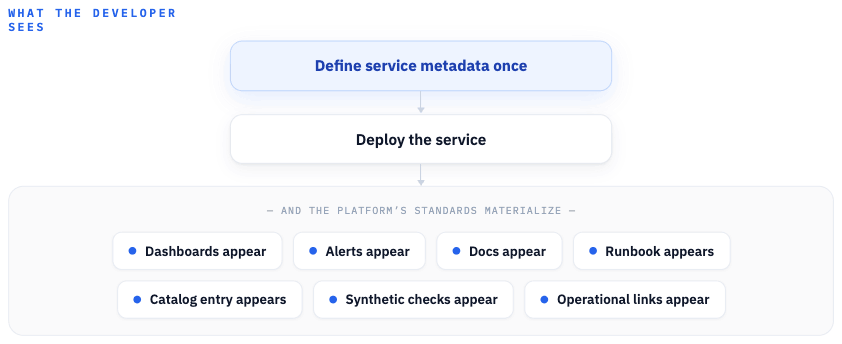
What the developer sees: edit one values file — something they already do — and the platform’s operational standards materialize around the service.
That’s the pitch, and notice what it isn’t: it isn’t asking developers to learn a new tool, adopt a new workflow, or care more about operations. They edit a values file — something they already do — and the platform’s standards materialize around their service. The platform gets dramatically easier to use precisely because operational excellence stopped being a to-do list and became a side effect.
The Self-Describing Platform
So what does “self-describing” actually mean? A self-describing platform is one that can answer, from its own structured model rather than from stale docs or tribal knowledge: what services exist, who owns them, where they’re deployed, what domains they expose, what dashboards and alerts protect them, what runbooks support them, who gets paged, what they depend on, and how critical they are.
Every platform claims to be able to answer those questions. The difference is the confidence interval. When the answers are projections of the same model that produced the running deployment, the answer isn’t “probably, let me check with the team” — it’s a query.
What’s Next
We’ve now gone from a drift problem, to Terraform generation, to a platform that generates its own operational knowledge. One article remains, and it’s the one that explains why this works — by reframing what a Helm chart fundamentally is. In the final article in this series, we’ll make the case that your Helm chart is really an abstract syntax tree, and that the platform around it is, whether you meant it or not, a compiler.