Why timeouts, retries, and connection pools can turn a slow dependency into a cascading failure — and how to keep that from happening.
One of the things that makes microservice architectures so powerful is also one of the things that makes them incredibly difficult to troubleshoot. A single request from a user might pass through half a dozen services before a response ever makes its way back.
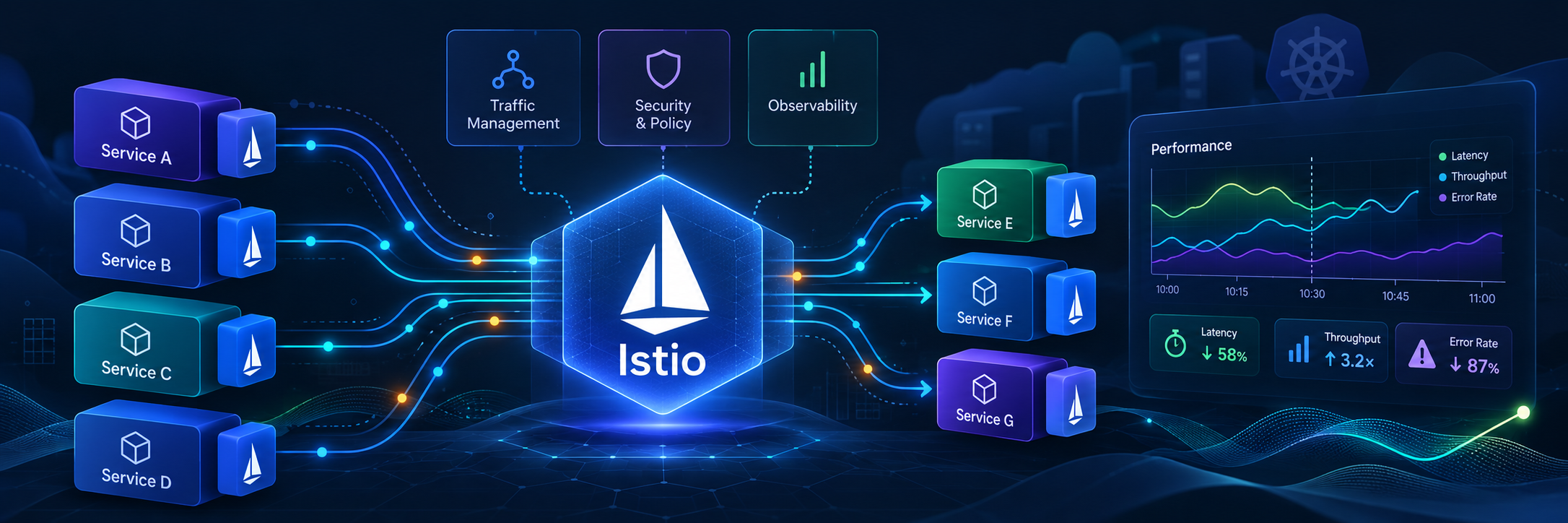
Each of those services has its own application logic, network connections, dependencies, and potentially its own timeout and retry policies. Throw a service mesh like Istio into the mix and you’ve introduced another layer capable of making decisions about how requests are handled.
That’s not necessarily a bad thing. In fact, it’s one of the reasons to use a service mesh in the first place. The trouble starts when these different layers aren’t configured with an understanding of what the others are doing.
I ran into a particularly interesting example of this while working on a Kubernetes platform where we were seeing intermittent HTTP 503 errors from an application composed of multiple microservices.
The application made a series of synchronous calls between services, and certain requests were legitimately taking longer than one second to complete. One of the Java/Spring microservices, however, had its HTTP client timeout set to just one second.
We initially tried increasing the timeout in Istio, which seemed like the obvious fix. But nothing changed. As it turned out, the application was terminating its own requests before Istio’s timeout ever had a chance to take effect.
That was only part of the problem.
Retries across the service chain were amplifying the failures, increasing the number of downstream requests and putting pressure on Envoy’s connection pools. What started as an application-level timeout issue had become a much broader service-mesh resilience problem.
Fixing it required coordinating application and mesh timeouts, tuning retries and connection-pool limits, and testing the behavior under load. We also moved the resulting configuration into our shared Helm charts so that the same problem wouldn’t have to be rediscovered service by service.
This article is about the mechanics behind that class of failure and how to configure Istio so a slow dependency doesn’t end up taking half your application down with it.
First Off — Why Do Microservices Make Timeouts So Complicated?
Consider a relatively ordinary application request:
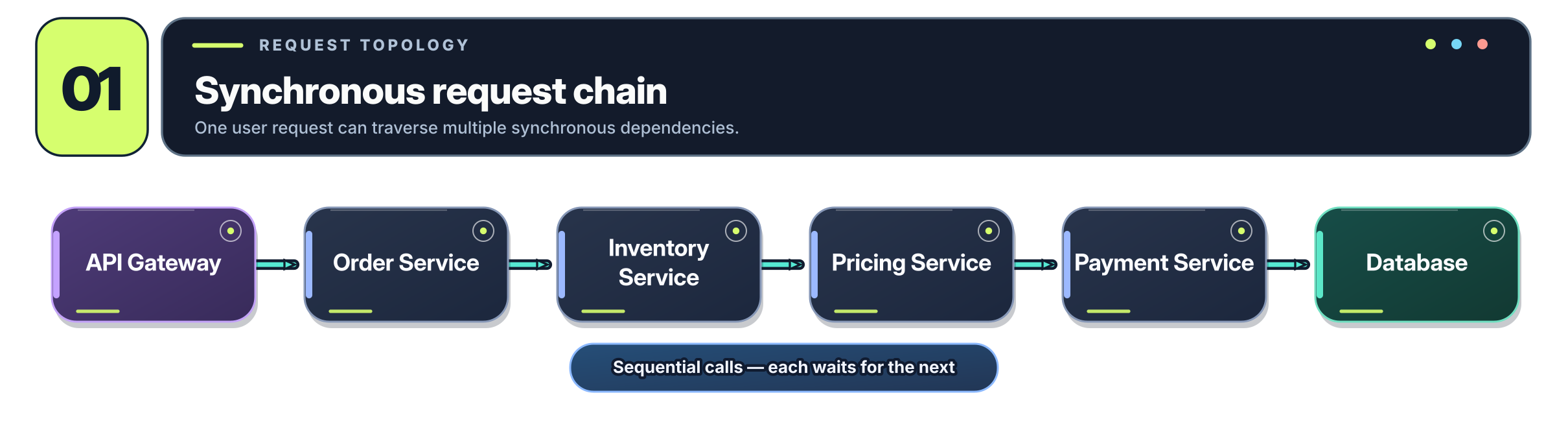
Each service needs something from the next one before it can finish what it’s doing. These are synchronous calls, meaning the caller waits for a response rather than dispatching work asynchronously and continuing on its way.
A sequence diagram gives us a better picture of what that actually means:
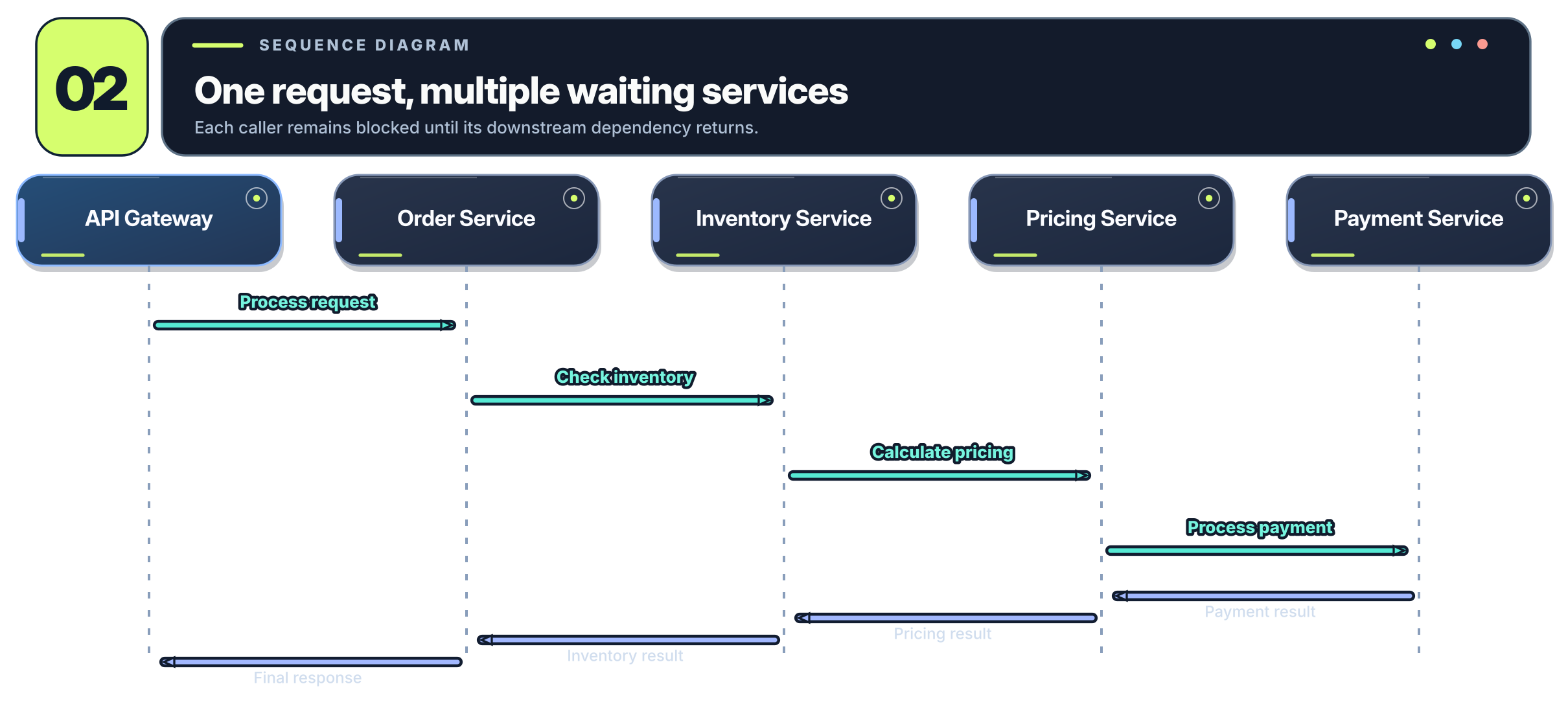
Now suppose the Pricing Service takes two seconds to respond instead of its usual 100 milliseconds.
That additional time doesn’t just affect the Pricing Service. The Inventory Service is waiting for Pricing, Order is waiting for Inventory, and the API Gateway is waiting for Order.
The delay propagates all the way back to the user.
This is why performance tuning in a microservice environment isn’t just about making individual services faster. It’s about managing how time and resources are consumed across the entire request chain.
And the first thing we need to establish is a concept called a latency budget.
Start With an End-to-End Latency Budget
Suppose an API has the following service-level objective, or SLO:
95% of requests must complete within 800 milliseconds.
That gives us 800 milliseconds to complete the entire transaction for at least 95% of requests.
We can’t simply give every downstream service a five-second timeout and expect to meet that objective. One service consuming its entire timeout would already put us well outside the desired response time.
Instead, we need to consider how that time is distributed across the request path.
For example:
| Operation | Budget |
|---|---|
| Gateway processing | 50 ms |
| Order service processing | 100 ms |
| Inventory call | 150 ms |
| Pricing call | 150 ms |
| Payment call | 250 ms |
| Safety margin | 100 ms |
| Total | 800 ms |
These are illustrative allocations, not measured latency percentiles. In practice, you’ll need distributed tracing and real request-duration data to determine where time is actually being spent.
It’s also worth noting that you can’t simply add the P95 latency of each service and call the result your application’s P95. Percentiles don’t work that way. You need to measure the entire transaction, including the dependencies and any concurrency between them.
The important principle is that every downstream call should operate within the remaining time available to its caller.
This includes retries.
If a service has already consumed most of its deadline, continuing to retry a downstream dependency may be completely pointless. Even if the retry succeeds, there might not be enough time left to return a successful response to the original user.
Gotcha #1: Istio Isn’t Necessarily the Layer Controlling Your Timeout
Let’s return to the incident I mentioned earlier.
The application was consistently experiencing failures around one second, and we had an Istio VirtualService configured with a longer request timeout.
Conceptually, the configuration looked something like this:
apiVersion: networking.istio.io/v1
kind: VirtualService
metadata:
  name: inventory
spec:
  hosts:
    - inventory
  http:
    - route:
        - destination:
            host: inventory
      timeout: 3s
The timeout field tells the relevant Envoy proxy how long it can wait for the request to complete before giving up.
The natural assumption was that increasing the value would allow the requests to finish.
So we tried increasing it.
Nothing happened.
The reason turned out to be that the Java HTTP client making the downstream call had its own one-second timeout.
Conceptually:
env:
  - name: HTTP_CLIENT_READ_TIMEOUT
    value: "1000"
The application was enforcing this timeout independently of Istio.
Here’s what that meant:
| Setting | Duration |
|---|---|
| Java HTTP client timeout | 1 second |
| Istio request timeout | 3 seconds |
| Legitimate request processing | 1.8 seconds |
The interaction between those deadlines is easier to see as a sequence:
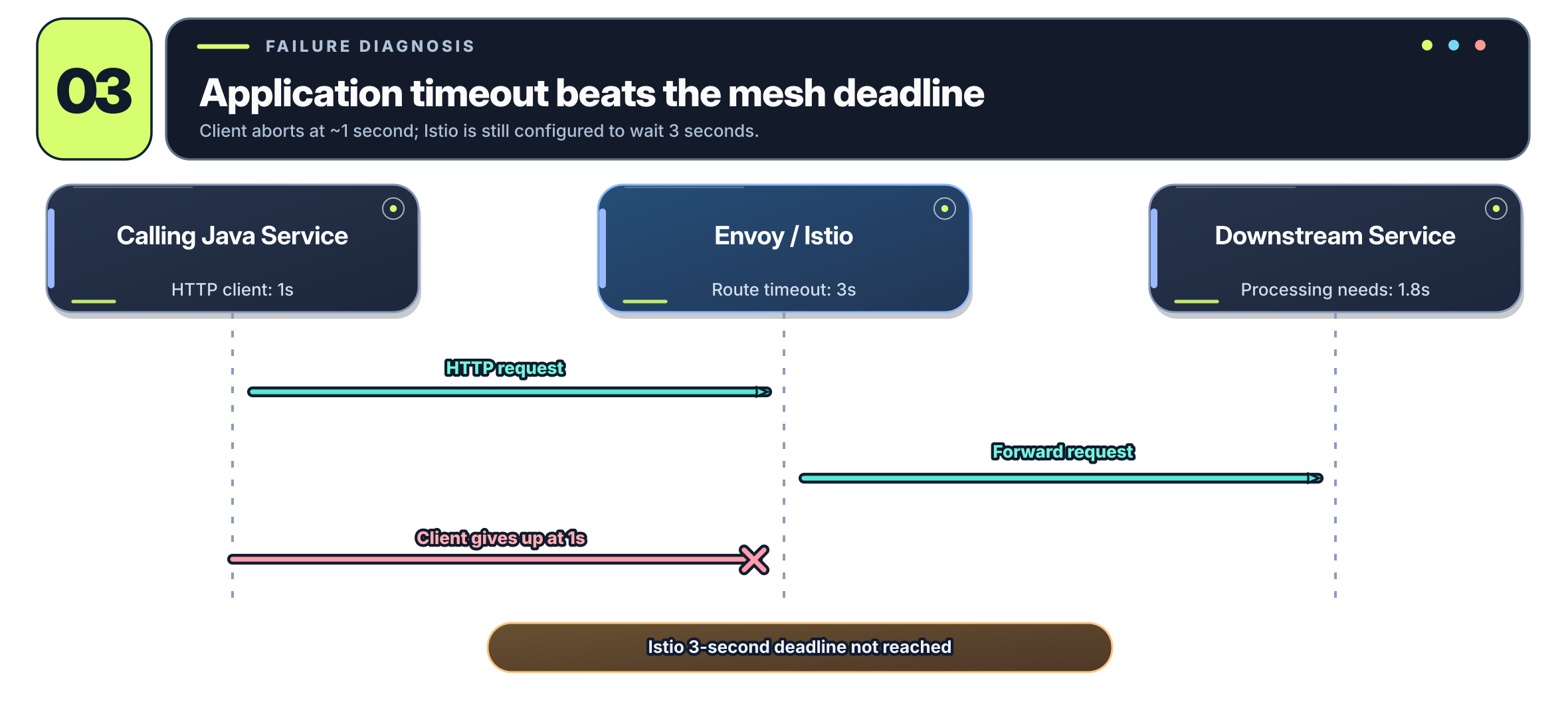
The request needed 1.8 seconds to complete. Istio was perfectly willing to wait three seconds, but Java was giving up after one.
Increasing Istio’s timeout from three seconds to five seconds couldn’t possibly fix it.
There’s no magical global request deadline that Istio controls across every layer of your application. Your application HTTP client, service mesh, ingress gateway, and even external load balancer may all have their own timeouts.
The effective deadline for a particular call is whichever applicable deadline expires first.
Coordinating Application and Istio Timeouts
In our case, the solution was to work with the application developers to increase the application’s timeout and allow Istio to enforce the shorter operational deadline.
For example:
| Layer | Timeout |
|---|---|
| Application HTTP client | 10 seconds |
| Istio request timeout | 3 seconds |
Now a request that legitimately takes 1.8 seconds can complete, while Istio can still stop waiting after three seconds when a dependency is genuinely taking too long.
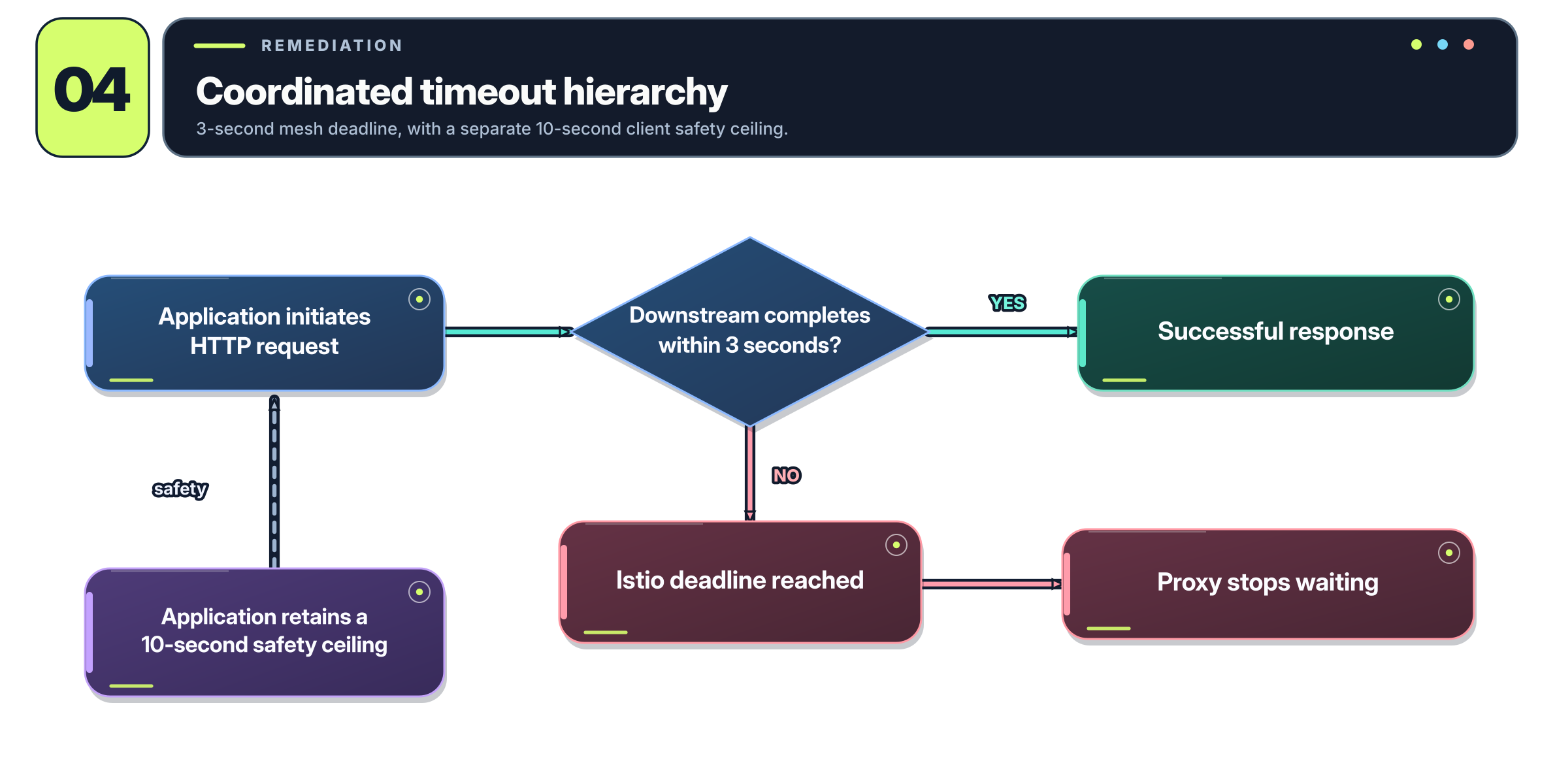
This doesn’t mean you should universally configure every application timeout to ten seconds or make every application timeout longer than every mesh timeout.
The correct relationship depends on the request path and which layer you intend to control the deadline. Application-level deadlines remain important for internal operations, calls outside the mesh, and protecting threads and other resources.
There’s another subtlety: when Envoy stops waiting for a response, the downstream application doesn’t necessarily stop processing the request. Cancellation needs to propagate correctly through the application and HTTP client. Otherwise, you’ve shortened the caller’s wait while the backend continues doing work nobody needs anymore.
What we wanted was a predictable hierarchy of timeouts, with the operational settings exposed through configuration rather than hard-coded into application binaries.
We’ll come back to how we accomplished that with Helm.
Gotcha #2: Retries Can Turn One Request Into a Dozen
Retries are one of the most useful features in Istio, and also one of the easiest ways to make an already struggling application perform even worse.
Transient failures happen all the time.
A pod might be terminating during a rolling deployment. A TCP connection might reset. An upstream endpoint might briefly become unavailable.
Retrying a request once under those circumstances can make the entire event invisible to the user.
Istio allows us to configure this behavior in a VirtualService.
For example:
apiVersion: networking.istio.io/v1
kind: VirtualService
metadata:
  name: inventory
spec:
  hosts:
    - inventory
  http:
    - route:
        - destination:
            host: inventory
      timeout: 3s
      retries:
        attempts: 1
        perTryTimeout: 2s
        retryOn: connect-failure,reset,gateway-error
A few things are happening here.
The timeout field gives the entire request a three-second deadline at this route.
The retries.attempts field specifies how many retries Istio is allowed to make after the initial attempt. With attempts: 1, the request can result in two upstream attempts total.
The perTryTimeout field limits how long an individual attempt can take, subject to the overall route deadline. In this example, an initial attempt could consume up to two seconds, leaving approximately one second for any subsequent attempt before the route’s three-second deadline expires.
Finally, retryOn tells Envoy which conditions justify another attempt.
Here we’re retrying connection failures, connection resets, and gateway errors. The gateway-error condition covers HTTP 502, 503, and 504 responses. These are only appropriate retry candidates when another attempt has a reasonable chance of succeeding.
If a 503 is coming from an already overloaded destination, retrying it may make the situation worse.
The Retry Multiplication Problem
Now here’s where things get interesting.
Imagine a request passing through four services:
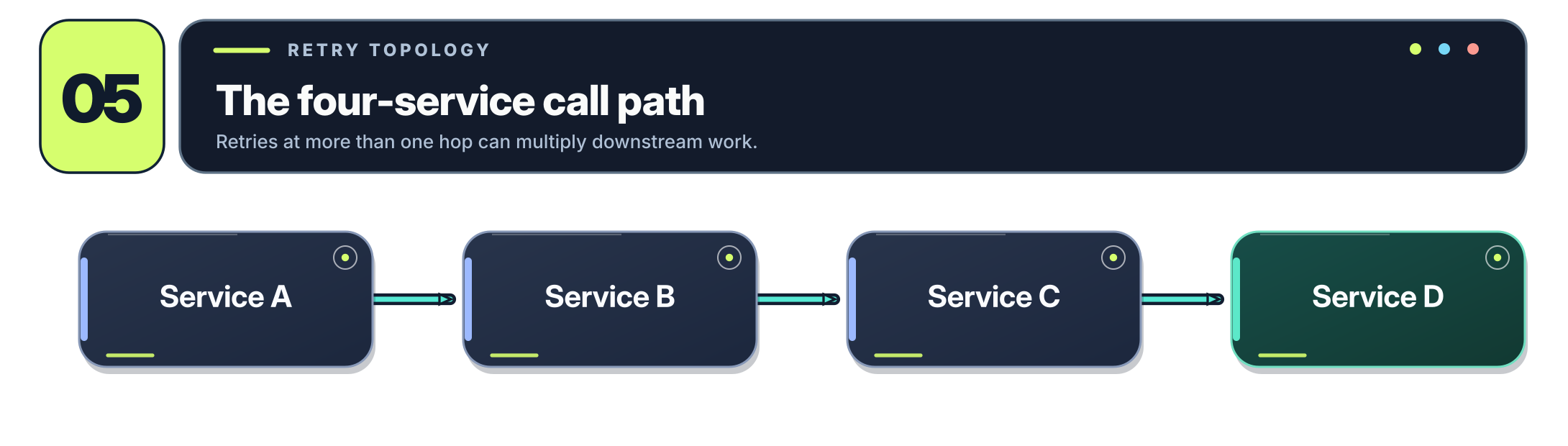
Suppose the call from C to D allows three total attempts, including retries.
And suppose B also retries its call to C twice.
The resulting request expansion looks like this:
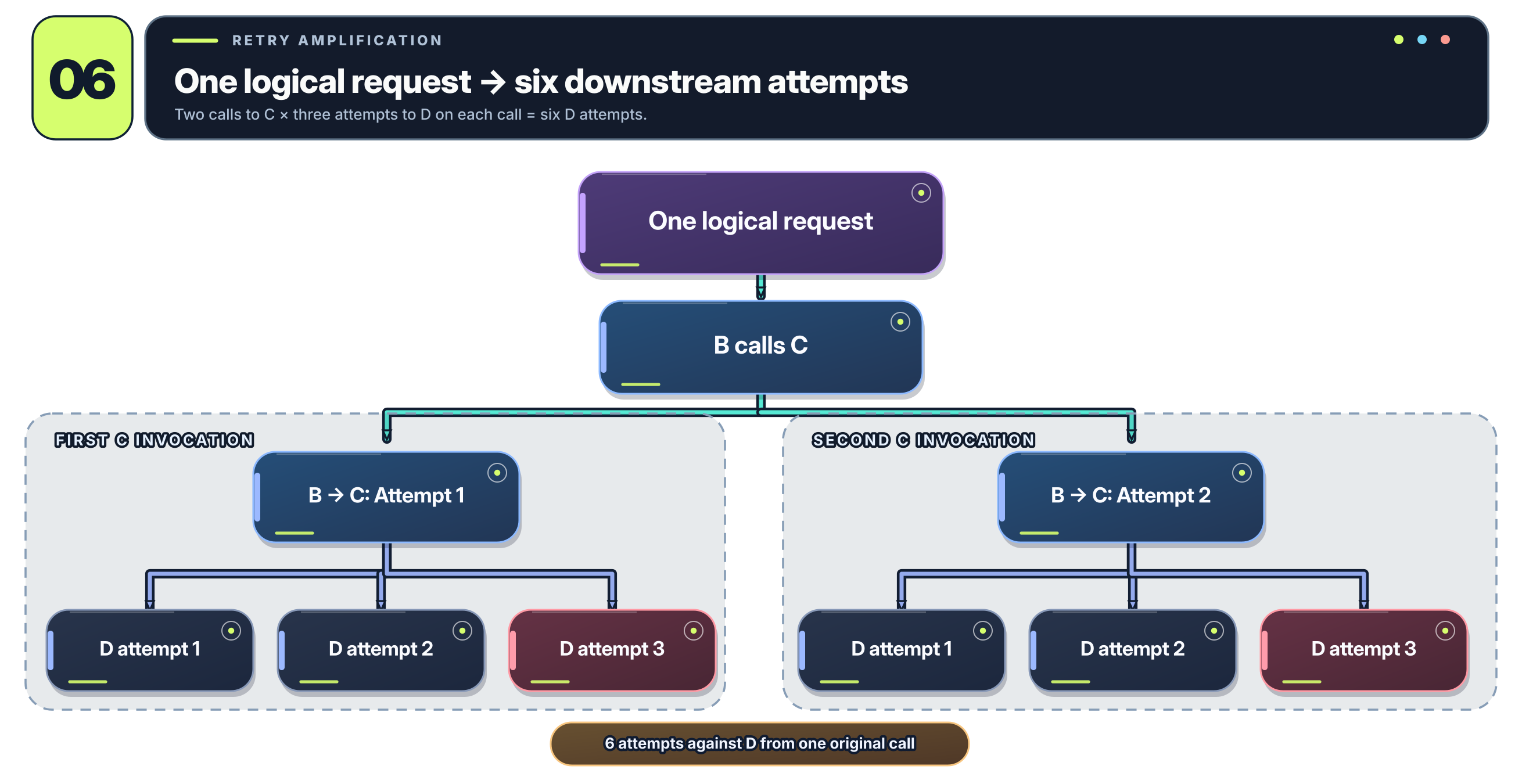
We’ve now generated six requests to D from one logical call originating at B.
And if A is also retrying B, that number can multiply again.
This is how a retry storm happens.
Suppose the original application is receiving 1,000 requests per second. Under the wrong failure conditions, a retry multiplier of six could result in 6,000 attempts per second against a downstream dependency.
That’s six times as much work for a service that’s potentially already failing because it can’t keep up.
The failure itself generates additional traffic, which causes more failures, which generate still more traffic.
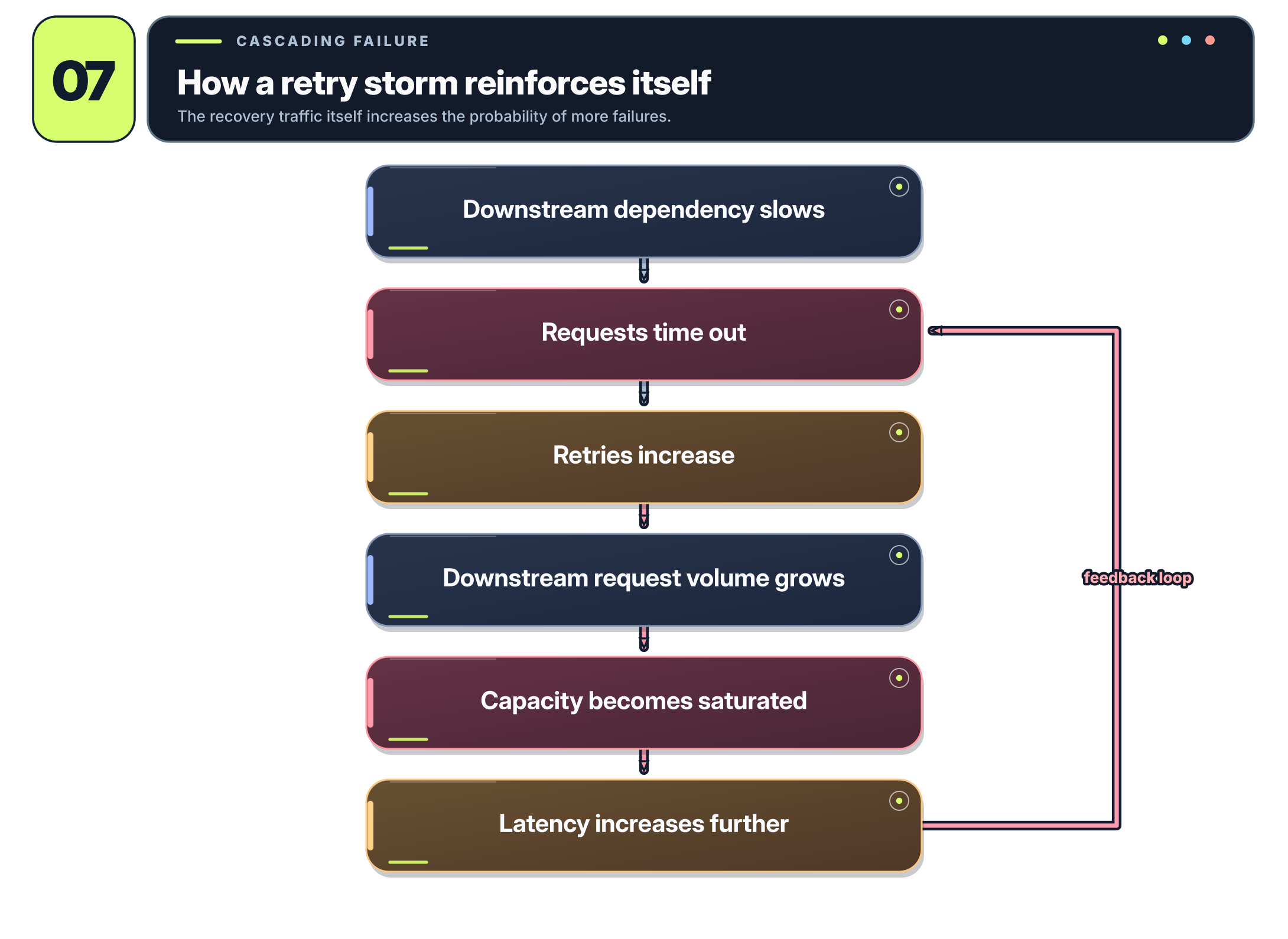
You can probably see where this is going.
Retrying at Every Layer Is Usually a Bad Idea
There’s an important distinction between application-level retries and service-mesh retries.
At the application level, developers may know whether an operation is safe to repeat, whether a response can be retrieved from a cache, or whether there’s an acceptable fallback.
Istio doesn’t have that business context. It primarily understands the network behavior and HTTP/gRPC responses it can observe.
For example, retrying an ordinary GET request may be safe, but retrying an operation that creates a payment or places an order could result in duplicated transactions unless the application implements idempotency.
This is why retry policies need to be coordinated.
A good starting point is to limit mesh retries to a small number of known transient failure conditions and let the application handle business-aware recovery.
More importantly, don’t configure retries independently at every hop without understanding the aggregate effect on downstream traffic.
Retry Budgets: Putting a Limit on Recovery Traffic
Limiting the number of retries per request is useful, but there’s another dimension to consider: how much total capacity are we willing to spend on retries?
Suppose a healthy service handles 10,000 requests per second.
Under normal conditions, retry traffic might be negligible. But during an outage, allowing every request to make multiple additional attempts could consume the majority of the destination’s capacity.
That’s where retry budgets come in.
Rather than only saying that each request may retry twice, we also want a policy that effectively says:
Only a controlled amount of upstream capacity may be used by concurrent retries.
Envoy supports retry-related circuit breakers, and newer Istio APIs may expose concurrency-oriented retry budgets, depending on the installed version and CRDs.
These budgets limit retry concurrency relative to current traffic rather than merely limiting the number of attempts attached to one request.
One caveat: a concurrency-based retry budget is not the same thing as a requests-per-second limit. It caps how many retries can be active simultaneously, not necessarily how many retries occur over a period of time.
The best approach is to combine a small per-request retry allowance, an overall deadline, and capacity protections rather than expecting any one setting to solve the problem on its own.
Gotcha #3: Connection Pools Are Finite
Let’s talk about the other half of the incident: connection-pool saturation.
When people hear “connection pool,” they often think about the pool of database connections maintained by something like HikariCP.
That’s not what we’re talking about here.
Envoy, the data-plane proxy used by Istio, maintains connections to upstream services. It also manages HTTP request concurrency, pending requests, and circuit-breaker limits.
Consider:
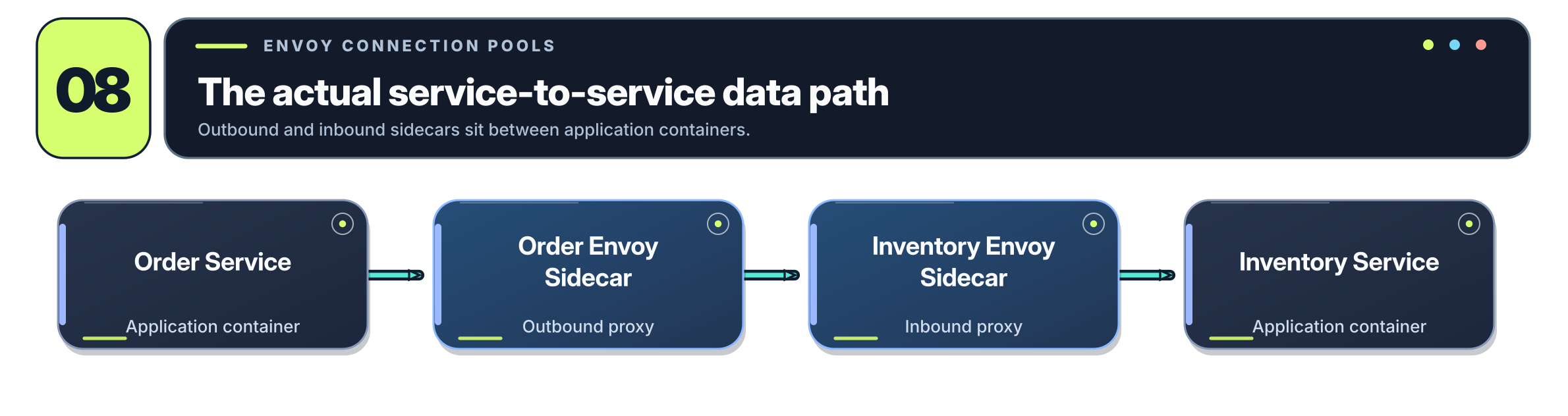
The calling Envoy proxy needs resources to communicate with the destination. There are only so many connections and concurrent requests it should allow before additional demand needs to wait or be rejected.
Istio exposes these limits through DestinationRule.
For example:
apiVersion: networking.istio.io/v1
kind: DestinationRule
metadata:
  name: inventory
spec:
  host: inventory
  trafficPolicy:
    connectionPool:
      tcp:
        maxConnections: 100
      http:
        http1MaxPendingRequests: 100
        http2MaxRequests: 200
There are three settings worth understanding here.
maxConnections limits the TCP connection concurrency allowed by the upstream connection pool.
http1MaxPendingRequests controls the number of HTTP requests permitted to wait for an available upstream connection.
http2MaxRequests controls the maximum number of concurrent upstream HTTP requests; despite its name, it isn’t exclusively useful for HTTP/2 traffic.
The distinction between connections and requests is important because HTTP/2 can multiplex many concurrent streams over a single TCP connection.
Also, these circuit-breaker limits generally apply to Envoy’s upstream cluster in the context of an individual proxy. Configuring maxConnections: 100 does not necessarily mean the entire Kubernetes Service, across every sidecar in the cluster, has a global limit of 100 connections.
What Happens When the Pool Fills Up?
Let’s suppose Inventory starts taking longer to respond.
Each request occupies upstream capacity for a longer period of time. Meanwhile, the Order Service continues sending requests, and any configured retries generate additional attempts.
The system starts moving through a predictable sequence:
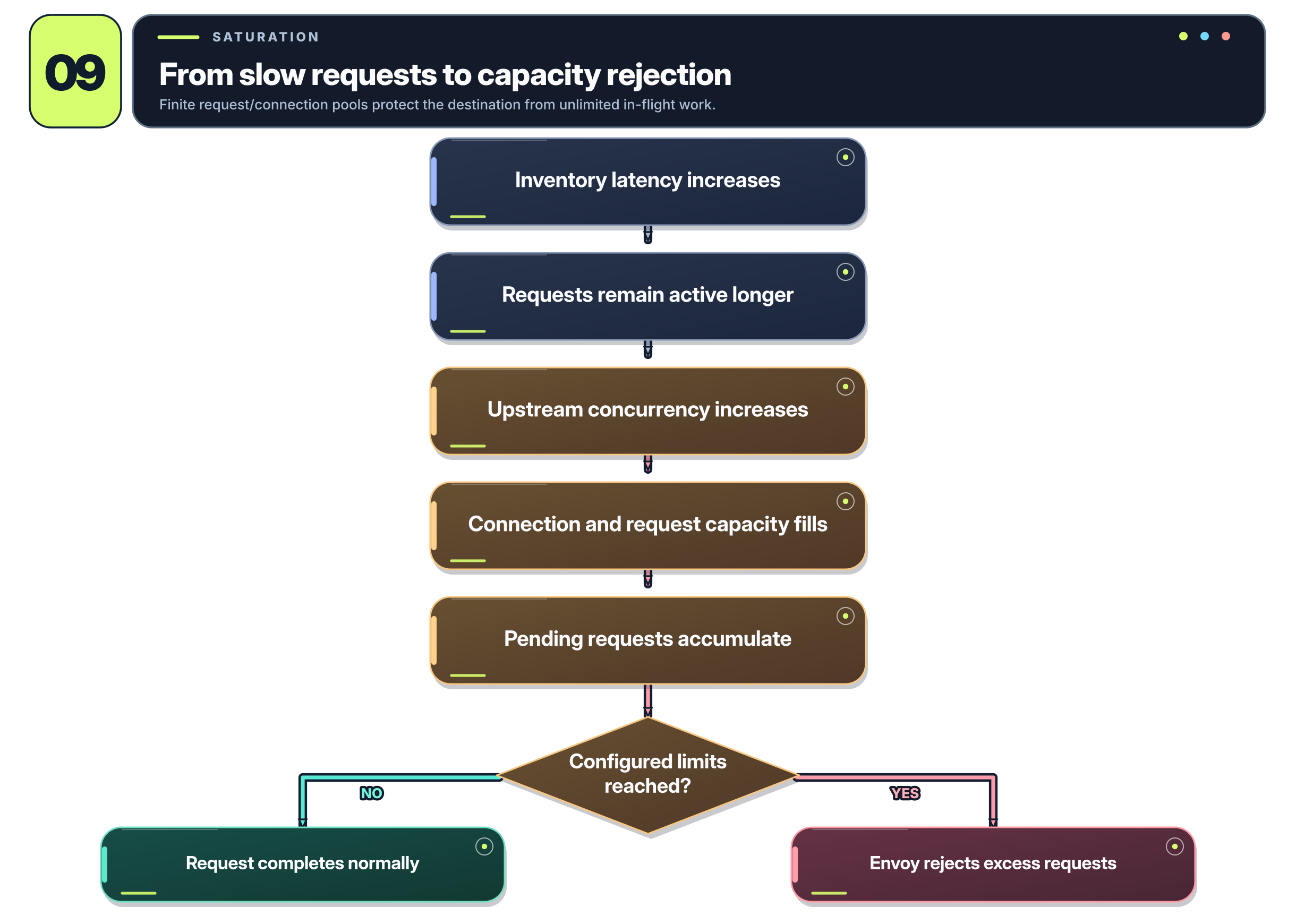
At that point, Envoy may generate its own 503 responses because upstream capacity limits have been reached.
This is particularly important when troubleshooting. A 503 generated by the application is not the same thing as a 503 generated by Envoy because the circuit breaker refused additional work.
They may look identical to the user, but their causes are completely different.
This is also why blindly increasing connection-pool limits is a bad idea.
If the destination can only process 200 concurrent requests efficiently, allowing 2,000 concurrent requests won’t make it ten times faster. You’ll probably just move the queue from Envoy into the application, where it may consume even more memory and worker threads.
The point of these limits isn’t to maximize concurrency. It’s to keep concurrency within what the destination can actually handle.
Circuit Breaking Isn’t a Substitute for Capacity Planning
Istio’s connection-pool circuit breakers are useful because they prevent a struggling dependency from accumulating unlimited work.
But they don’t create more capacity.
In fact, when a circuit breaker activates, some requests are intentionally rejected.
That’s the whole idea.
Instead of allowing requests to pile up until everything times out, the system rejects excess work so the remaining requests have a better chance of completing.
That means a healthy circuit-breaking configuration may still produce some errors during an overload.
The distinction is that those errors should be bounded and isolated, rather than turning one unhealthy dependency into a much larger outage.
Also, don’t confuse Envoy’s connection/request circuit breakers with every behavior of an application-level circuit breaker. Envoy’s circuit-breaker limits and outlier detection aren’t necessarily implementing the traditional closed/open/half-open state machine you might be familiar with from libraries such as Resilience4j.
Removing Unhealthy Instances with Outlier Detection
Connection limits protect capacity, but what happens when a particular service instance is consistently returning errors?
Suppose Inventory has four pods:
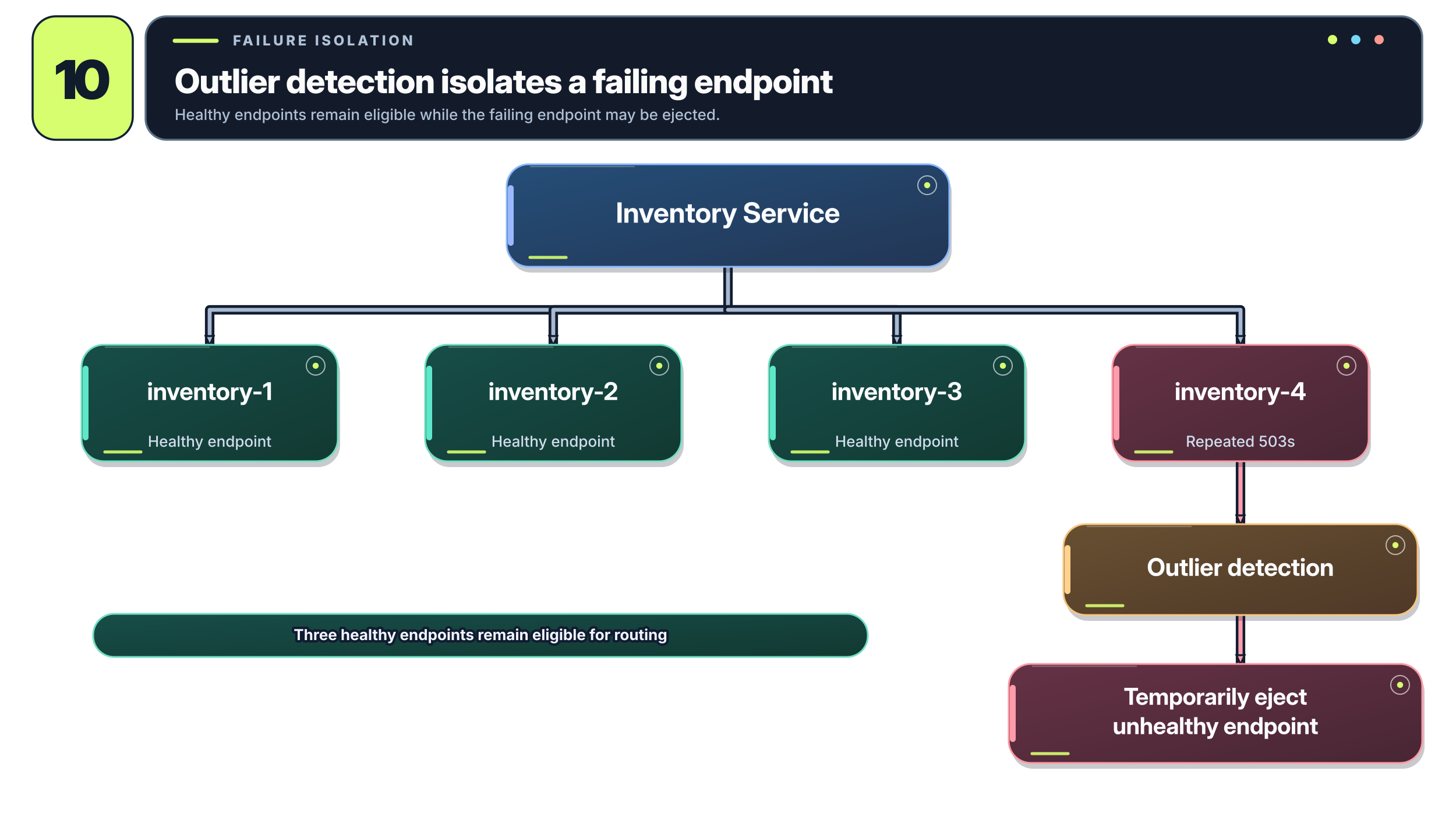
Kubernetes may still consider inventory-4 ready, depending on how its readiness probe is implemented.
Envoy can recognize repeated upstream failures and temporarily eject an unhealthy endpoint from its load-balancing pool through a feature called outlier detection.
For example:
apiVersion: networking.istio.io/v1
kind: DestinationRule
metadata:
  name: inventory
spec:
  host: inventory
  trafficPolicy:
    outlierDetection:
      consecutive5xxErrors: 5
      interval: 10s
      baseEjectionTime: 30s
      maxEjectionPercent: 50
Here, Envoy can temporarily eject endpoints that meet the configured consecutive-5xx failure criteria. The interval controls how often detection is evaluated, baseEjectionTime sets the base duration for ejection, and maxEjectionPercent limits the proportion of endpoints that may be ejected.
Pretty useful.
But there’s a catch.
Ejecting two pods from a four-pod service cuts the number of available endpoints in half. If those remaining instances were already close to capacity, you’ve just doubled the work they need to handle.
This is why outlier detection needs to be tuned alongside connection limits, request concurrency, and the actual capacity of the destination.
It also isn’t a cure for a failure affecting every replica equally. If all pods are returning errors because of the same unavailable database, ejecting endpoints may simply reduce capacity without solving the dependency failure.
How Would You Actually Diagnose This in New Relic?
So far we’ve talked about the configuration itself, but none of it is particularly useful if you can’t tell what’s happening when something goes wrong.
For the original incident, the interesting thing wasn’t simply that the application was returning 503s. It was the relationship between those errors, the duration of failed requests, retry activity, and the pressure on upstream connections.
This is where distributed tracing and saturation metrics become extremely useful.
I would approach an incident like this in a few stages.
First, Find the Failing Request Path
Start in New Relic APM and identify which transactions are seeing elevated errors or latency.
Then inspect distributed traces for those transactions.
Suppose a trace looks like this:
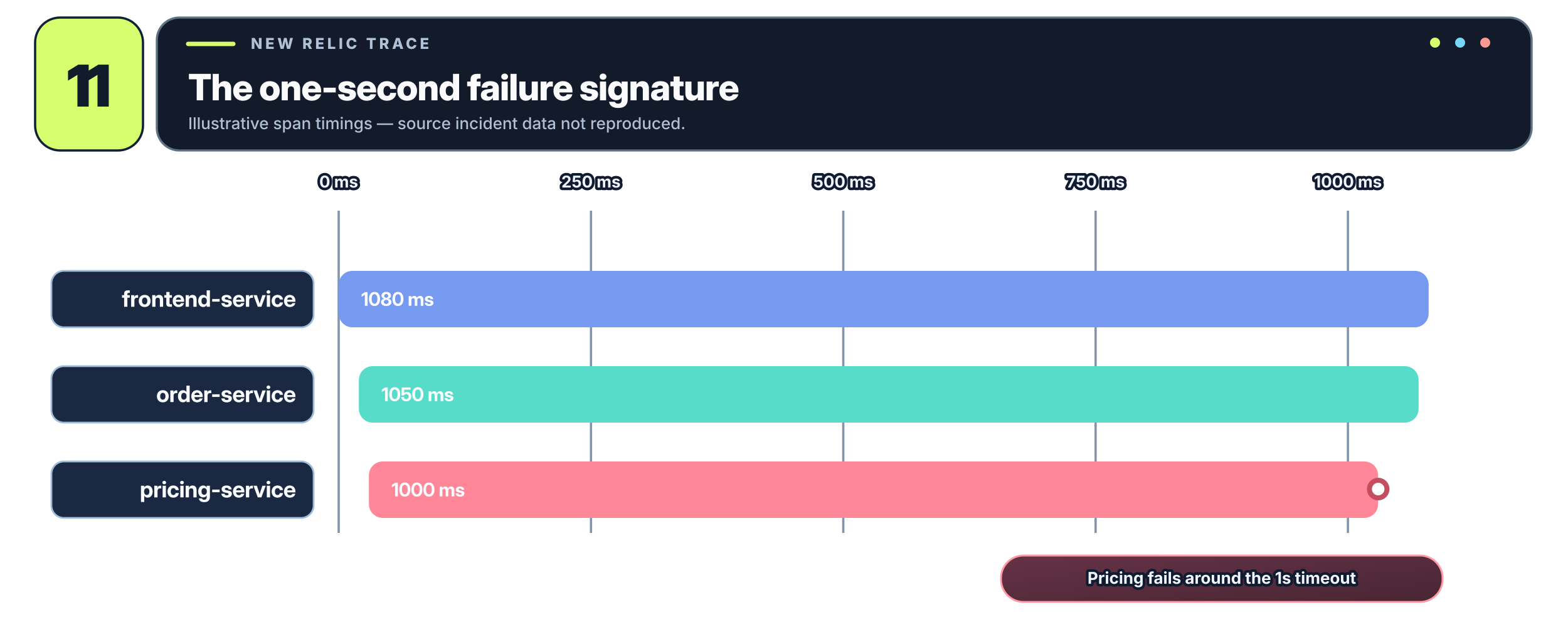
Now suppose you open several more failing traces and see essentially the same thing.
The Pricing Service call keeps failing at almost exactly one second.
That should immediately raise a question:
Why one second?
A configured timeout is one of the first things I’d investigate, especially if successful requests occasionally take longer.
The next step would be comparing the application’s HTTP client timeout with the Istio timeout applied to that route.
This is also where application logs become valuable. A Java client timeout exception associated with the same trace is much stronger evidence than request duration alone.
Next, Determine Which Layer Generated the Error
Envoy access logs can include details that aren’t obvious from an HTTP status code by itself.
For example, Envoy response flags can distinguish conditions such as:
| Flag | Meaning |
|---|---|
UT | Upstream request timeout |
UO | Upstream overflow / circuit breaking |
UF | Upstream connection failure |
UC | Upstream connection termination |
These are worth knowing.
A 503 associated with UO suggests Envoy’s capacity protection was activated. A timeout-related response associated with UT points toward a different class of failure.
And an application-generated error may have neither flag.
HTTP timeouts often surface as 504, while circuit-breaker overflow can produce 503, but you shouldn’t diagnose the problem from status codes alone. Look at the response flags, response-code details, and corresponding application exceptions.
If you have Envoy logs flowing into New Relic, these become particularly useful fields to correlate with traces and errors.
Then, Look for Retry Amplification
The next question is whether one failing request is generating additional downstream work.
One useful measurement is the ratio of downstream attempts to the logical requests that caused them.
For a single service-to-service dependency:
Request amplification factor = downstream request attempts ÷ original dependency calls
If every logical call normally generates one attempt, the ratio should be close to one.
If it suddenly rises to three or four, retries are consuming additional capacity.
Be careful when calculating this across an entire microservice application, though. A single inbound request may legitimately call several services even without retries. You need to account for the normal call graph before treating all downstream traffic as retry amplification.
Useful Envoy statistics include upstream retry counters and retry-overflow counters.
Metric names vary depending on your Istio/Envoy version and how the metrics are ingested into New Relic, but the raw Envoy statistics include names ending in:
upstream_rq_retry
upstream_rq_retry_success
upstream_rq_retry_overflow
The exact metric naming and dimensions exposed in New Relic will depend on the telemetry pipeline.
Finally, Look at Saturation
This is probably the most important addition to a monitoring strategy for this kind of incident.
Most people start by looking at errors and latency. Those are useful, but they’re often telling you about a problem that’s already affecting users.
Saturation metrics tell you how close the system is to exhausting the resources required to continue processing work.
For Envoy, I’d be especially interested in:
- Active upstream connections
- Active upstream requests
- Pending upstream requests
- Upstream request overflows
- Connection overflows
- Retry overflows
- Endpoint ejections
Envoy provides upstream cluster statistics with names such as:
upstream_cx_active
upstream_rq_active
upstream_rq_pending_active
upstream_rq_pending_overflow
upstream_rq_retry
These are examples of underlying Envoy statistics, not guaranteed New Relic metric names.
Detailed Envoy statistics aren’t necessarily included in Istio’s standard telemetry by default. You may need to enable the relevant statistics through Istio’s proxy stats configuration and arrange for them to be collected by your metrics pipeline.
Why Relative Utilization Matters
Suppose New Relic tells you that a service has 75 active upstream connections.
Is that good or bad?
Well, how many connections are allowed?
If the configured limit is 100, you’re using 75% of your capacity.
If the limit is 10,000, there’s probably nothing interesting about that number.
This is why you want to correlate utilization with configured capacity:
Connection utilization = active upstream connections ÷ configured connection limit
Pending-request utilization = pending upstream requests ÷ configured pending-request limit
There’s an important implementation detail here: compare metrics and limits at the same scope. Since Envoy connection-pool limits are generally enforced per proxy and upstream cluster, dividing a cluster-wide sum of active connections by one proxy’s configured limit would produce a meaningless percentage.
You also need to account for the protocol. Under HTTP/2, active request concurrency may tell you more about saturation than TCP connection count.
And in some cases, growing pending-request counts are a better warning signal than connection utilization.
A queue that’s growing rapidly tells you that incoming demand is exceeding the rate at which the destination can process requests.
That’s precisely the sort of condition you want to catch before the queue reaches its limit and requests start getting rejected.
Building a New Relic Dashboard for Service-Mesh Resilience
For this failure class, I would build a dashboard around the progression from downstream degradation to retry amplification and eventual saturation.
Rather than having twenty unrelated charts, group the metrics according to the problem they’re meant to diagnose.
| Category | Metrics |
|---|---|
| User impact | 5xx/503 rate, throughput, P95/P99 latency |
| Timeouts | Application timeout exceptions, Envoy upstream timeouts |
| Retries | Retry rate, retries per original request, retry overflow |
| Connections | Active upstream connections, connection overflow |
| Requests | Active requests, pending requests, pending-request overflow |
| Failure isolation | Endpoint ejections, destination error rates |
| Application capacity | Busy worker threads, queued tasks, rejected work |
| Proxy capacity | Envoy CPU, memory, CPU throttling |
The most useful aspect of this dashboard would be having these signals aligned on the same time axis.
You want to be able to see whether an increase in downstream latency was followed by increased retries, followed by growing pending requests, followed by 503s.
For example:
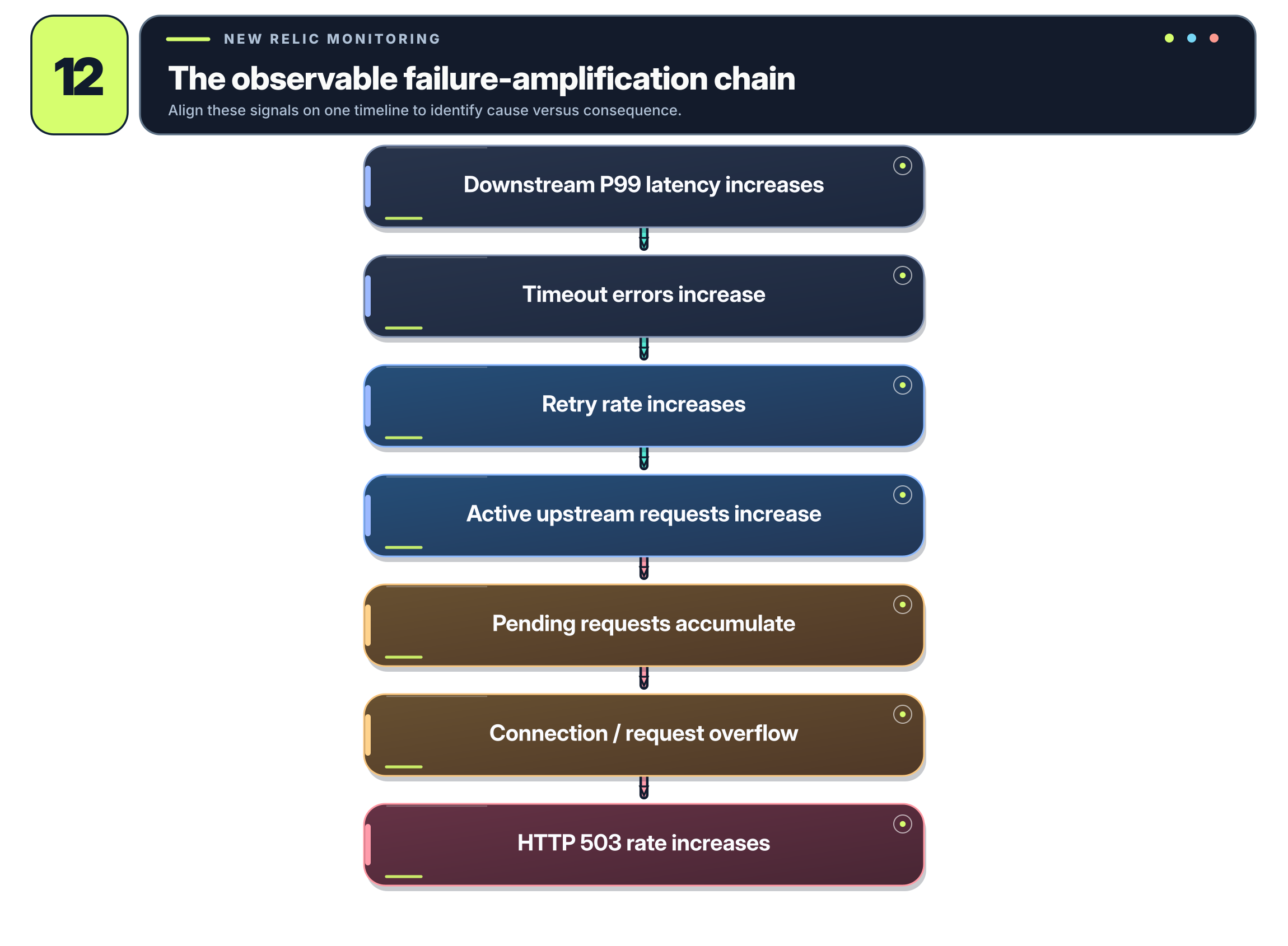
That sequence is far more informative than simply getting an alert that the application’s error rate exceeded five percent.
It also helps distinguish the original failure from the mechanisms that amplified it.
What Should We Alert On?
Not every metric deserves a pager alert.
I’d separate monitoring into three categories.
Service degradation: Elevated P95/P99 latency, timeout exceptions, and dependency error rates. These tell you that something is slowing down or failing.
Resource saturation: Active request utilization, connection-pool pressure, pending-request growth, retry amplification, and endpoint ejections. These tell you that the service is losing the capacity needed to recover.
Customer impact: Sustained 5xx rates, availability SLO violations, and repeated capacity-protection failures. These tell you the problem is now affecting users.
For fixed-capacity pools, you might initially investigate warning thresholds around 70% utilization and critical thresholds around 85%. Those aren’t universal values, though. A healthy service may regularly operate above those thresholds, while another service may become unstable long before reaching them.
Pending-request trends can be especially useful. A queue of 100 requests that’s stable may be perfectly normal. A queue growing from 10 to 100 over a few seconds could be much more concerning.
And for Java/Spring services, don’t forget the application itself.
If Tomcat’s worker threads are saturated or its executor queue is growing, Envoy may simply be waiting on an application that doesn’t have enough execution capacity. Increasing Envoy’s connection limits won’t solve that.
The objective is to monitor the entire path, not just the proxy.
Verifying the Effective Istio Configuration
There’s another common mistake worth mentioning.
Just because you updated a VirtualService manifest doesn’t necessarily mean the proxy handling your requests is using the configuration you think it is.
Before spending hours chasing a timeout that doesn’t appear to be changing, verify the effective Envoy configuration.
Istio provides an extremely useful command for this:
istioctl proxy-config routes <pod-name> -n <namespace>
This shows the route configuration that has actually been delivered to the selected proxy.
You can inspect the relevant route in more detail using:
istioctl proxy-config routes <pod-name> \
  -n <namespace> \
  -o json
Other useful commands include:
# Inspect the upstream clusters known to Envoy
istioctl proxy-config clusters <pod-name> \
  -n <namespace>

# Inspect available upstream endpoints
istioctl proxy-config endpoints <pod-name> \
  -n <namespace>

# Look for Istio configuration problems
istioctl analyze -n <namespace>
This matters in GitOps-managed environments because you have several layers to consider:
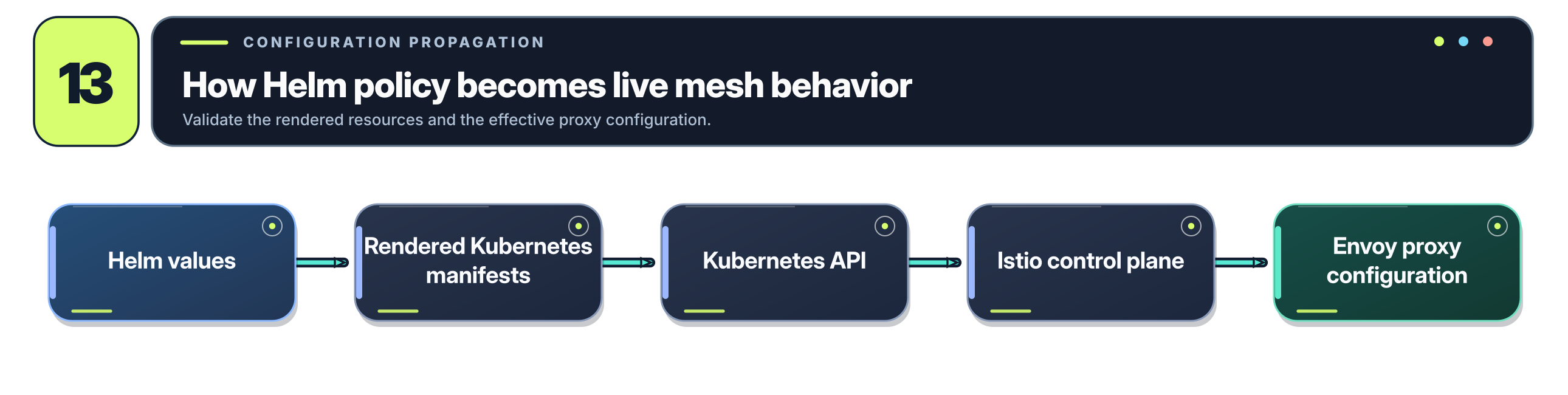
A valid Helm value doesn’t automatically guarantee the intended Envoy behavior.
The value might not be referenced by the template, the resulting resource might not apply to the intended route, or another configuration might be influencing the effective behavior.
I would always verify the rendered manifest and the actual proxy configuration before assuming a policy change has taken effect.
Moving Resilience Configuration Into Helm
One of the most useful outcomes of the incident I described earlier was moving the relevant behavior into our shared Helm chart conventions.
Previously, the application contained an aggressively short timeout that required involvement from the application developers to change.
That’s not where you want all your operational tuning to live.
It’s perfectly reasonable for application developers to implement safe defaults and cancellation behavior, but the actual values often need to vary between environments or change as traffic patterns evolve.
A development cluster may have fewer replicas, different hardware, or slower dependencies than production. A performance-testing environment might deliberately introduce latency to exercise failure behavior.
These environments may need different settings, but changing them shouldn’t necessarily require a new application build.
Here’s an example of how I would organize the configuration in values.yaml:
application:
  readTimeout: 10s

istio:
  timeout: 3s

  retries:
    attempts: 1
    perTryTimeout: 2s
    retryOn: connect-failure,reset,gateway-error

  connectionPool:
    maxConnections: 100
    http1MaxPendingRequests: 100
    http2MaxRequests: 200

  outlierDetection:
    consecutive5xxErrors: 5
    interval: 10s
    baseEjectionTime: 30s
    maxEjectionPercent: 50
The numbers are illustrative, not production recommendations. They need to be established through measurement and testing.
The application can consume its own timeout through the Deployment:
env:
  - name: HTTP_CLIENT_READ_TIMEOUT
    value: {{ .Values.application.readTimeout | quote }}
Of course, this only works if the application is actually written to read that environment variable and apply it to the HTTP client. Adding an environment variable to a Deployment doesn’t magically reconfigure Spring.
The VirtualService can consume the Istio-specific settings:
apiVersion: networking.istio.io/v1
kind: VirtualService
metadata:
  name: inventory
spec:
  hosts:
    - inventory
  http:
    - route:
        - destination:
            host: inventory

      timeout: {{ .Values.istio.timeout | quote }}

      retries:
        attempts: {{ .Values.istio.retries.attempts }}
        perTryTimeout: {{ .Values.istio.retries.perTryTimeout | quote }}
        retryOn: {{ .Values.istio.retries.retryOn | quote }}
And the same chart can render a DestinationRule using the connection-pool and outlier-detection values.
Now suppose we need to experiment with a different timeout in staging.
We could override the defaults in values-staging.yaml:
istio:
  timeout: 5s
  retries:
    attempts: 1
    perTryTimeout: 3s
The new values can move through the normal Helm/GitOps deployment process without rebuilding the application image.
This is a much cleaner separation of responsibilities.
The application developers remain responsible for implementing safe request handling, appropriate client behavior, and cancellation support. The platform team can manage the service-mesh policies that govern how services communicate.
There’s another benefit: you can standardize the configuration across dozens of services.
Instead of each team inventing its own timeout, retry, and connection-pool conventions, the shared Helm chart can provide a consistent starting point while allowing exceptions where the workload requires them.
That’s exactly what we ended up doing. The incident-specific corrections became shared Helm chart defaults rather than remaining a one-off fix for a single microservice.
Testing the Configuration With JMeter
Now we get to the part that actually tells us whether any of these changes worked.
It’s easy to write a DestinationRule that looks reasonable. It’s considerably harder to know whether it behaves reasonably when a dependency starts failing under load.
A configuration that works perfectly under normal circumstances can behave very differently during partial failure.
For this reason, I would highly recommend validating service-mesh resilience settings with repeatable load tests.
We used JMeter to exercise the affected request path and validate the corrected configuration.
The important thing is to test both normal behavior and failure behavior.
Test #1: Legitimate Slow Requests
Start with requests that take longer than the original application timeout but remain within the desired mesh deadline.
For example:
| Parameter | Value |
|---|---|
| Application timeout | 10s |
| Istio timeout | 3s |
| Downstream processing | 1.8s |
The request should complete successfully.
This validates that the original one-second application timeout is no longer prematurely terminating legitimate work.
Test #2: An Unresponsive Dependency
Next, introduce a downstream dependency that takes longer than the configured Istio deadline.
| Parameter | Value |
|---|---|
| Istio timeout | 3s |
| Downstream processing | 8s |
The caller should stop waiting within its effective deadline, subject to the configured retry behavior and protocol.
You also want to verify what happens to the abandoned downstream operation. Does the application honor cancellation, or does it continue consuming resources after the caller has given up?
Test #3: Retry Amplification
Introduce a controlled transient failure and observe the number of downstream attempts generated by each logical request.
For example:
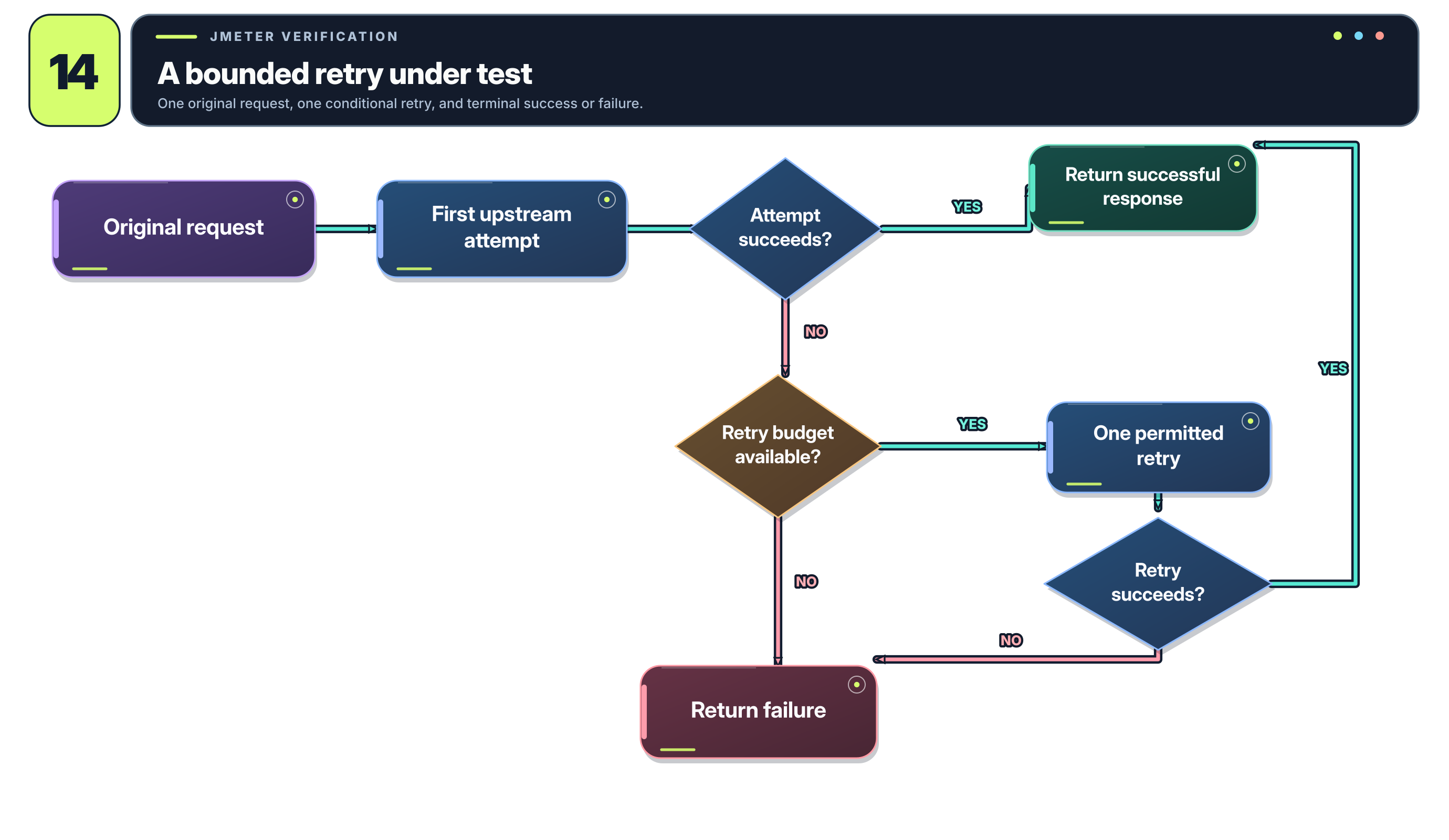
What you don’t want is a single failing call generating large numbers of repeated requests across several services.
This is particularly important when retry policies exist at both application and mesh layers.
Test #4: Connection-Pool Saturation
Increase concurrent requests while introducing additional latency in the destination service.
Watch:
- Active upstream connections
- Active upstream requests
- Pending upstream requests
- Connection/request overflow
- Retry rate
- 503 rate
- P95/P99 latency
You want to establish where the service reaches its sustainable capacity and confirm that Envoy’s limits protect the destination rather than allowing uncontrolled concurrency.
Some rejected requests are acceptable during an intentionally induced overload. The question is whether the overload remains bounded and whether healthy request paths continue operating.
Test #5: Endpoint Failure and Recovery
Finally, test what happens when an individual service instance starts returning errors.
You can use a controlled test service, fault injection, or intentionally unhealthy instances to reproduce the behavior.
Confirm that:
- Repeated failures are detected.
- The unhealthy endpoint is ejected when configured criteria are met.
- Enough capacity remains to handle traffic.
- The endpoint can return to service appropriately.
- The application recovers without persistent retry storms or saturation.
JMeter generates the traffic, while controlled failure injection and your observability stack provide the conditions and evidence needed to evaluate the policies.
One thing I would strongly recommend is running these tests against the actual chart values you intend to deploy.
Testing a manually modified VirtualService and then deploying a different set of Helm defaults doesn’t establish much confidence in the production configuration.
A Few Other Things Worth Watching
There are some less obvious issues that can undermine otherwise reasonable Istio policies.
Istio’s Own Resource Limits
The Envoy sidecar consumes CPU and memory just like the application container.
If istio-proxy is CPU-throttled under load, that can increase request latency even when the application itself has spare capacity.
Monitor the proxy’s CPU usage, throttling, memory consumption, and request-processing behavior rather than treating it as free infrastructure.
HTTP/2 Versus HTTP/1.1
Connection counts don’t mean the same thing under every protocol.
HTTP/2 allows multiple concurrent requests to share a connection. A low TCP connection count doesn’t necessarily mean low request concurrency.
For HTTP/2-heavy applications, active requests and stream concurrency may be much more useful saturation indicators.
Retries During an Overload
Just because an HTTP response is technically eligible for retrying doesn’t mean you should retry it.
A 503 caused by an overloaded service may be exactly the sort of failure where another attempt makes things worse.
Retry policies should be validated against the actual failure modes your services experience.
Outlier Detection Reducing Available Capacity
Removing unhealthy endpoints sounds universally beneficial until you realize that every ejected instance reduces the capacity available to serve requests.
Monitor endpoint ejections alongside request concurrency and saturation. Aggressive ejection thresholds can make a degraded service even less capable of recovering.
The Service Mesh Doesn’t Replace Application Resilience
Istio can manage many network-level failure behaviors, but it doesn’t know whether a payment has already been processed or whether repeating an operation is safe.
Applications still need appropriate timeout handling, cancellation, idempotency, and business-specific recovery behavior.
The mesh and application need to complement one another, not independently fight over request behavior.
Common Mistakes
After working through all of this, a few recurring mistakes are worth keeping in mind.
Only increasing timeouts. Longer timeouts can hide a problem while allowing more concurrent requests to accumulate. Sometimes the timeout genuinely needs to increase, but you should understand which layer is terminating the request and why.
Assuming Istio owns every deadline. Application HTTP clients, gateways, and other infrastructure may terminate requests before the mesh does.
Retrying too aggressively. Retries consume time and capacity. The more layers that independently retry, the greater the potential amplification.
Retrying non-idempotent operations. A successful retry can be just as problematic as a failed one if the original request already performed a side effect.
Increasing connection limits without measuring capacity. Removing a queue limit doesn’t remove the bottleneck behind it.
Ejecting too many endpoints. Outlier detection can protect callers but also reduce the destination’s effective capacity.
Looking only at 503 rates. Errors tell you that something failed. Retry activity, pending-request growth, and resource saturation can tell you why it’s failing and whether the situation is getting worse.
Assuming your manifests represent the effective configuration. Always verify that Istio has pushed the expected settings into Envoy.
Testing only healthy traffic. A resilience policy that’s never been exercised under failure conditions is a policy you’re trusting on faith.
Performance Tuning Is Really Failure Management
The most important thing I took away from debugging this class of problem was that performance tuning in a distributed system isn’t just about making individual requests faster.
It’s about controlling what happens when something inevitably becomes slow or unavailable.
Timeouts determine how long we’re willing to wait.
Retries determine whether another attempt is worth making.
Retry budgets determine how much capacity we’re willing to spend recovering from failures.
Connection-pool limits and circuit breakers keep a failing dependency from consuming unlimited resources.
Outlier detection helps isolate unhealthy instances.
Observability lets us distinguish the original failure from the secondary problems it creates.
And load testing tells us whether all of those mechanisms actually behave the way we expect when the system is under pressure.
In our case, what began as intermittent 503s caused by an overly aggressive Java timeout ultimately led to a much more comprehensive review of our service-to-service resilience configuration.
The immediate fix was straightforward once we understood the problem. Increase the application timeout, allow Istio to enforce the intended operational deadline, and correct the retry and connection-pool settings.
The more valuable change was making those policies configurable through Helm, standardizing the defaults across our services, and testing the resulting behavior under load.
A slow dependency should not be able to turn one request into a dozen, exhaust upstream capacity, and bring unrelated services down with it.
That’s ultimately what a properly tuned service mesh should help you accomplish: not eliminating every failure, but making sure the failures that do occur remain predictable, bounded, and recoverable.
Additional Resources
For anyone interested in going deeper, these are the places I’d start:
- Istio — VirtualService Reference — Request timeouts, retries, routing behavior, and retry policy configuration.
- Istio — DestinationRule Reference — Connection pools, circuit-breaking limits, outlier detection, and retry-budget support where available.
- Istio — Circuit Breaking — Official examples of protecting upstream services with connection and request limits.
- Istio — Envoy Statistics — Configuring collection of additional Envoy statistics beyond the standard Istio metrics.
- Istio — Performance and Scalability — Performance characteristics of the Istio data plane and control plane.
- Envoy — Circuit Breakers — How Envoy implements connection, request, retry, and pending-request circuit breakers.
- New Relic — Envoy Integration — Collecting Envoy telemetry and monitoring upstream behavior.
- OneUptime — Saturation Metrics — Additional discussion of resource utilization, queue growth, connection pools, and saturation-based alerting.
- Apache JMeter — Load and performance testing for reproducing concurrency-related failures and validating recovery behavior.
The example values in this article are intended to illustrate the interactions between application and Istio configuration. They should be tuned against your workloads, measured latency distributions, expected traffic, and the capabilities of your installed Istio version.